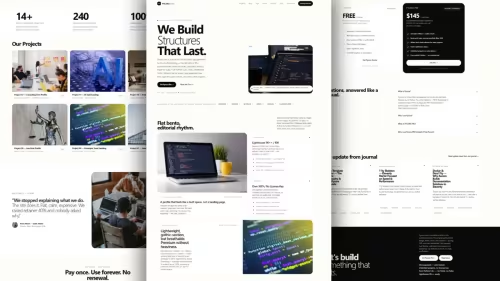
Cubber - Jekyll Cyber Template - Futuristic, Multipurpose, Portfolio Review: Is It Worth It in 2026?
Jekyll cyber futuristic template with portfolio, blog, gallery, services, author, SEO auto. Markdown, YAML, responsive, own 100% source, one-time.
jekyll • cyber-template • futuristic-template • jekyll-template • portfolio-template • multipurpose-template • jekyllthemes • jamstackthemes •
Table Of Content
- Introduction
- What is Cubber - Jekyll Cyber Template - Futuristic, Multipurpose, Portfolio?
- Key Features
- Futuristic Cyber Aesthetic and Responsive Layout Engine
- Content Authoring via Markdown and YAML Configuration
- Multipurpose Pre-Built Layout Modules
- Automated Search Engine Optimization SEO Metadata
- Modular Navigation Widgets and Configurable Site Branding
- Pre-Designed Contact Form Integration
- 100% Source Code Ownership with Cloud-Native Deployments
- Performance and SEO
- Pricing
- Who Is This For?
- Who Should Skip This?
- Verdict
- See It Live
- Related Themes
Introduction
Modern web development often forces creators into a difficult trade-off between visual uniqueness and overall system performance. Traditional content management platforms rely on heavy server-side processing, complex database query layers, and dynamic runtime execution pipelines that frequently introduce latency, security vulnerabilities, and continuous maintenance overhead. On the other end of the spectrum, generic static website templates frequently lack visual identity, offering repetitive layouts that fail to leave a lasting impression on tech-focused audiences, digital agencies, and independent creators who want a memorable online footprint.
This structural trade-off is particularly challenging for developers, designers, and tech professionals building online portfolios, service showcases, or personal tech blogs. Establishing a distinct digital presence requires an aesthetic that feels forward-looking while retaining absolute control over site speed, hosting infrastructure, and underlying source code. Dynamic frameworks often slow down build times and inflate client resource consumption, while overly simplistic templates require extensive custom styling to achieve a modern cyber look.
The growing adoption of static architectures built on the Jamstack methodology has made Jekyll a primary framework choice for developers who value clean Markdown content authoring and fast static site compilation. However, finding a ready-to-deploy Jekyll theme that combines a cyber-futuristic visual design with comprehensive pre-built content modules—such as built-in galleries, service listings, author profiles, widget integration, and contact form layouts—remains a persistent challenge. This detailed review evaluates Cubber - Jekyll Cyber Template - Futuristic, Multipurpose, Portfolio, examining its technical architecture, feature set, workflow efficiency, content structure, and overall value for production site deployments in 2026.
What is Cubber - Jekyll Cyber Template - Futuristic, Multipurpose, Portfolio?
Cubber is a specialized static website template built specifically for the Jekyll static site generator within the modern Jamstack ecosystem. At its core, Cubber is designed to serve as a multipurpose digital platform, catering to developer portfolios, technology service showcases, agency landing pages, personal blogs, and image galleries. It bridges the gap between futuristic visual design aesthetics and lightweight static site generator performance, giving developers a fully structured project architecture out of the box.
Built entirely around static generation principles, Cubber utilizes plain Markdown files for body content authoring and structured YAML files for global data and layout configurations. This clean separation of concerns isolates content creation from presentational code, allowing creators to publish blog posts, add portfolio projects, or alter site navigation without needing to touch core Ruby dependencies or layout compilation rules once the build workflow is set up. The template is responsive across screen dimensions, adapting fluidly across mobile smartphones, tablets, laptop screens, and desktop displays without breaking its distinct visual aesthetic.
Purchasing Cubber grants developers complete ownership of 100% of the underlying project source code under a transparent, single one-time payment model. Unlike platform-as-a-service website builders or subscription-based theme marketplaces that tie users to continuous billing cycles or proprietary ecosystems, Cubber provides standard directory structures and uncompiled template files that can be version-controlled using standard Git commands. Content creators who prefer non-technical editing workflows can also integrate third-party web-based Git clients or headless Content Management Systems (CMS) to modify Markdown and YAML assets without needing a local code editor.
The template is engineered for flexible deployment across both local development environments and cloud-native hosting infrastructures. Developers can run local development servers using native Ruby commands (jekyll build or jekyll serve) or deploy the project repository directly to cloud static hosting platforms such as Cloudflare Pages, GitHub Pages, Netlify, or Vercel. With built-in features covering contact form layout integration, customizable sidebar and footer navigation widgets, and automated search engine optimization (SEO) metadata generation, Cubber offers a complete, production-ready Jamstack publishing solution.
Key Features
Futuristic Cyber Aesthetic and Responsive Layout Engine
Cubber incorporates a visual design system tailored specifically for technology-centric web projects. The design theme combines modern UI styling, futuristic structural elements, sharp visual lines, and visual framing optimized for readability across high-density displays. Rather than relying on heavy client-side JavaScript execution or bloated external UI frameworks, the structural responsive layout relies on CSS grid and flexbox standards. This structural approach ensures that portfolio grids, service listings, media galleries, and multi-column blog articles scale automatically across mobile phones, tablets, laptops, and wide desktop displays without layout breakage or unintended horizontal scrollbars.
Content Authoring via Markdown and YAML Configuration
Content management inside Cubber follows standard Jekyll static site generator conventions. Articles, portfolio case studies, service descriptions, and author biographies are authored using standard Markdown (.md) files containing structured front-matter headers. Global configurations, site titles, meta descriptions, website cover images, social link profiles, widget blocks, and navigation menus are managed directly within readable YAML (.yml) data files. This file-driven architecture eliminates database dependencies, enabling rapid repository backup, simple Git version tracking, and swift static compilation.
Multipurpose Pre-Built Layout Modules
Cubber includes pre-configured page layouts designed to handle various digital publishing needs. The theme provides ready-to-use template files for home landing pages, portfolio displays, blog index feeds, single article details, visual photo galleries, service offerings, author bio pages, and dedicated contact views. Each layout module is integrated with Liquid tags and partial include files, enabling developers to build complete content directories simply by placing structured Markdown files into designated project folders without building layout HTML structures from scratch.
Automated Search Engine Optimization (SEO) Metadata
Search Engine Optimization in Cubber is built directly into the site compilation pipeline to streamline metadata management across search crawlers and social indexers. The template features automatic meta tag generation that dynamically generates canonical links, page titles, Open Graph tags, social card parameters, and meta descriptions straight from front-matter YAML headers and site configuration files. This automated SEO engine ensures that published posts, project pages, and service blocks adhere to structured metadata standards automatically.
Modular Navigation Widgets and Configurable Site Branding
Customizing the user interface in Cubber is driven by central configuration settings rather than complex template overrides. Developers can configure primary site navigation bars, update main website cover images, and set up sidebar or footer widget blocks through structured configuration files. The widget management framework allows site administrators to toggle widget content, update footer layout blocks, reorder navigation trees, and adjust branding assets quickly, offering full layout flexibility without requiring edits to raw Ruby or HTML build files.
Pre-Designed Contact Form Integration
To support client communication, business inquiries, and service requests, Cubber provides a visual contact page layout pre-configured with interactive form markup. The layout includes structured contact form components designed to connect with third-party static form endpoints or serverless form processors. This allows visitors to send messages directly through the visual cyber-themed web form without requiring server-side database hosting or custom backend scripts.
100% Source Code Ownership with Cloud-Native Deployments
Purchasing Cubber gives site owners full rights to 100% of the project's source code under a single one-time purchase agreement with no recurring license validation mechanisms. The lightweight static build output compiled by Jekyll can be uploaded to any web server or static host. Whether running local terminal build routines or setting up automated deployment pipelines on cloud static hosts such as Cloudflare Pages, Netlify, or GitHub Pages, the template delivers minimal build overhead and full developer independence.
Performance and SEO
Because Cubber is built around static site generation with Jekyll, site performance optimizations occur at compile time rather than execution time. By generating clean HTML, CSS, and asset files before deployment, the resulting site eliminates runtime database queries, server-side processing bottlenecks, and dynamic page rendering delays. This static approach leads to excellent Core Web Vitals scores, low initial page loading times, reduced First Contentful Paint latency, and lower system resource usage across client browsers.
From an SEO perspective, Cubber prevents common indexing errors through automated tag construction. As pages compile, the built-in SEO engine builds canonical tags, meta titles, descriptions, and Open Graph card attributes directly from page front-matter and configuration parameters. Consequently, search engine crawlers can index every blog entry, portfolio case study, and service block without relying on client-side JavaScript processing.
Pricing
Cubber is available as a single product download for a one-time price of $65. This single payment includes complete access to 100% of the theme's uncompiled source code, layout templates, CSS styles, and component partials, along with future template updates. There are no monthly subscription fees, domain license check routines, or platform transaction charges. Developers own the raw source files entirely and can deploy, modify, and host their project across any infrastructure platform without recurring costs.
Who Is This For?
- Tech Professionals & Software Developers: Engineers, cybersecurity researchers, and developers who need a personal portfolio and tech blog featuring a distinct cyber aesthetic, fast static loading speeds, and Markdown-based content workflows.
- Creative Tech Agencies & Studios: Digital agencies, software development firms, and UI/UX design teams looking for a structured, pre-built Jamstack template to showcase services, work portfolios, team profiles, and company updates.
- Jamstack Enthusiasts & Markdown Writers: Authors, technical writers, and content creators who want a fast, file-based publishing platform that integrates with Git repositories, cloud deployment services, and optional headless CMS tools.
- Developers Seeking Full Code Ownership: Web creators who want complete control over their project's source code, avoiding platform lock-in, subscription fees, and complex dynamic backend hosting requirements.
Who Should Skip This?
- Non-Technical Users Seeking Drag-and-Drop Editors: Individuals who prefer visual drag-and-drop page editing tools and do not wish to work with YAML site configurations or Markdown files may find static site generators challenging unless integrated with a headless CMS.
- E-Commerce Businesses Requiring Complex Shopping Carts: Merchants who require built-in shopping cart management, user registration systems, real-time inventory tracking, or payment gateway databases out of the box will need external integrations or dynamic e-commerce platforms.
- Projects Requiring Traditional Minimalist Branding: Organizations looking for standard conservative corporate designs or light-mode minimal aesthetics might find Cubber's cyber-futuristic visual theme too bold for their brand requirements.
Verdict
Cubber offers a practical combination of eye-catching futuristic design and fast static site performance built on Jekyll and Jamstack standards. By pairing a cyber visual theme with clean static generation, the template solves the challenge of creating a distinct online presence without suffering performance penalties, hosting lock-in, or ongoing maintenance overhead. Its pre-designed layout modules for portfolios, blogs, service listings, visual galleries, and author profiles reduce production deployment time for developers and agencies.
The use of plain Markdown files for content authoring and structured YAML files for global site configuration streamlines ongoing site management. Combined with automated SEO tag generation, flexible widget placement, and responsive layout styling, Cubber delivers strong technical value. Supported by full 100% source code ownership for a standard one-time fee of $65, it provides an efficient, performant solution for technical web projects in 2026.
See It Live
Read the full theme details at Cubber - Jekyll Cyber Template - Futuristic, Multipurpose, Portfolio.
Try the demo: Demo
Related Themes
Explore more at All Themes and Premium Themes.
← Docuna - Astro Starlight Docs Template - Documentation and Landing vs ForgeDocs — All-in-One Astro Starlight Theme for Landing Page, Documentation, and Blog - Which Is Better?Honest Review: Docusar - Docusaurus Docs Template - Documentation, Blog, Landing for Startups and Agencies →
Need Custom?
Hire via Fiverr Escrow
72+ verified reviews, escrow protected.
ORDER CUSTOM →