Honest Review: Docusar - Docusaurus Docs Template - Documentation, Blog, Landing for Startups and Agencies
Docusaurus documentation template with docs, blog, landing page, dark mode, search. MDX ready, SEO auto, fast, own 100% source, one-time.
docusaurus • docs-template • documentation-template • docusaurus-template • react-template • docs-website • blog-template • premiumthemes •
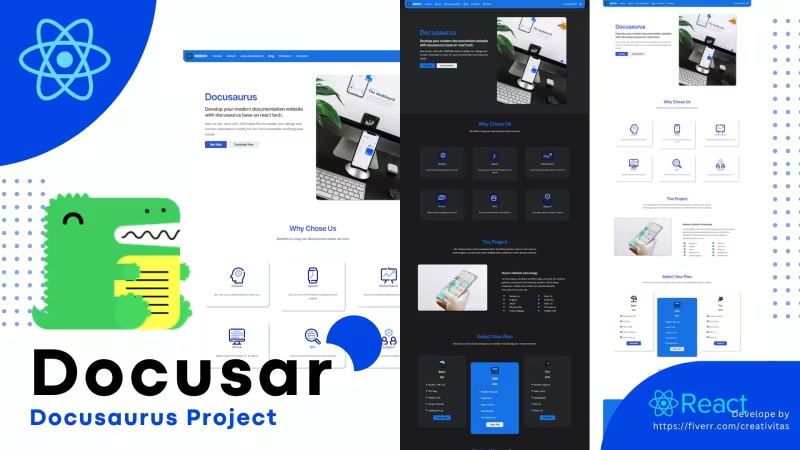
Table Of Content
- Introduction
- What is Docusar - Docusaurus Docs Template - Documentation, Blog, Landing?
- Key Features
- Integrated Three-in-One Architecture: Landing, Documentation, and Blog
- MDX Content Engine for Dynamic React Components
- Built-in Search Functionality and Dark Mode System
- Local Setup, Node/Yarn Workflows, and Clean Folder Hierarchy
- Automated SEO Optimization and Static Generation
- Zero CMS Lock-in with 100% Source Code Ownership
- Performance and SEO
- Pricing
- Who Is This For?
- Who Should Skip This?
- Verdict
- See It Live
- Related Themes
Introduction
Maintaining separate systems for a product landing page, technical user documentation, and an engineering blog introduces friction into a software organization’s publishing workflow. Small development teams, open-source maintainers, and indie startups frequently encounter the challenge of managing fragmented tools. A common pattern involves hosting a marketing site on a web builder, technical docs on a hosted knowledge-base platform, and company announcements on an isolated blogging engine. This fragmented architecture leads to inconsistent branding, complex domain routing, high recurring subscription costs, and duplicated content updates across multiple repositories.
When engineers update a core feature, technical documentation must be revised immediately alongside marketing release notes. If these content channels exist in isolated software ecosystems, the overhead of synchronization increases technical debt. Furthermore, heavy database-driven content management systems introduce unnecessary latency, security vulnerabilities, and infrastructure management requirements for websites that primarily serve structured static content.
The goal of modern technical publishing is to unify these content channels under a single, highly performant static pipeline. By adopting a Git-based workflow where content exists as standard Markdown and interactive React components, teams can eliminate third-party vendor dependence and streamline their publication pipeline. The Docusar - Docusaurus Docs Template - Documentation, Blog, Landing framework addresses this problem directly by providing a complete, ready-to-deploy static site foundation that bundles a product landing page, a deep documentation hierarchy, and a publication blog into a single project.
What is Docusar - Docusaurus Docs Template - Documentation, Blog, Landing?
Docusar is a pre-configured, production-ready static template built on top of the Docusaurus engine and React framework. Designed specifically for developers, SaaS creators, open-source project leads, and technical writers, Docusar brings together three critical components of software web presence—a landing page, comprehensive documentation layouts, and an integrated blog—into a unified repository. Instead of starting from a bare-bones Docusaurus scaffolding and spending dozens of hours configuring custom styles, landing page layouts, global search integrations, and component structures, Docusar provides a complete design system out of the box.
At its core, Docusar operates on a file-system-based content model using Markdown and MDX. Content creators write their technical articles and blog posts in local files, while the underlying Docusaurus architecture compiles these files into fast static assets. The template eliminates the need for complex database management or server-side execution environments, allowing site administrators to host the generated output on virtually any static hosting service, including GitHub Pages, Cloudflare Pages, Vercel, or Netlify.
The template ships with complete ownership of the raw source code upon purchase. For a one-time fee of $75, buyers receive full access to all project assets, styling rules, components, and configuration files without ongoing licensing fees or platform lock-in. It includes native dark mode toggling, automated search indexing setup, built-in SEO metadata engines, and customizable navigation trees.
By establishing a structured layout for product landing sections alongside traditional sidebar-driven documentation trees, Docusar bridges the gap between software marketing and technical reference material. It allows teams to manage their entire web presence through familiar code editing tools and standard version control workflows.
Key Features
Integrated Three-in-One Architecture: Landing, Documentation, and Blog
Standard documentation setups typically focus exclusively on rendering technical guides, leaving teams to build landing pages and blogs elsewhere. Docusar addresses this limitation by combining a product landing page, structured documentation, and an article blog into a single unified workspace. The home layout provides dedicated visual sections designed to present key software features, call-to-action elements, live links, and hero banners.
Navigating between marketing content, developer guides, and product update posts requires no cross-domain redirects or external page loads. The integrated router keeps users within a consistent user interface. The documentation engine supports multi-level nested sidebars, table-of-contents auto-generation, and breadcrumb trails. Meanwhile, the blog module provides chronologically indexed posts, tags, author metadata, and pagination. This unified layout structure significantly reduces setup overhead while maintaining visual cohesion across all pages.
MDX Content Engine for Dynamic React Components
Static text can sometimes prove insufficient when explaining complex technical concepts, API integrations, or interactive components. Docusar leverages the power of MDX, enabling content creators to embed live React components directly inside Markdown documents. Writers can insert code snippets, interactive buttons, custom callout cards, UI previews, and tabbed code blocks alongside traditional prose.
import Tabs from '@theme/Tabs';
import TabItem from '@theme/TabItem';
?Tabs?
  ?TabItem value="yarn" label="Yarn" default?
    ```bash
    yarn install
    yarn start
    ```
  ?/TabItem?
  ?TabItem value="npm" label="NPM"?
    ```bash
    npm install
    npm run start
    ```
  ?/TabItem?
?/Tabs?
The MDX implementation allows technical writers to build rich documentation without breaking out of their writing environment. Code blocks feature native syntax highlighting for numerous programming languages, copy-to-clipboard functionality, and line-highlighting directives. This technical capability ensures that complex software specifications remain engaging, clear, and actionable for developer audiences.
Built-in Search Functionality and Dark Mode System
Effective documentation relies heavily on rapid content discoverability. Docusar comes configured with full-text search capabilities out of the box, allowing users to locate specific technical terms, API methods, or blog topics instantaneously. The search system indexes titles, section headers, tags, and document bodies across both the documentation tree and the blog repository.
In addition to search functionality, Docusar includes an automatic, persistent theme switch supporting light and dark modes. The dark mode feature adapts color palettes across every site layout section—including code blocks, sidebar navigation, headers, footers, and landing page modules. The theme preference persists across browser sessions and automatically respects the user's operating system preferences upon first visit, ensuring an accessible reading experience under any lighting condition.
Local Setup, Node/Yarn Workflows, and Clean Folder Hierarchy
Getting started with Docusar follows standard front-end development workflows. The installation process uses familiar tools like Node.js and Yarn or NPM package managers. Users download the distribution zip file, extract the assets into a local workspace directory, and execute dependency installation scripts.
# Extract the project archive and navigate to the project directory
cd docusar-project
# Install project dependencies using Yarn or NPM
yarn install
# Start the local development server with hot reloading
yarn start
The template maintains an intuitive directory structure. Site configuration options—such as global site titles, primary navigation header links, social icons, and footer columns—are centered within the primary docusaurus.config.js file. Documentation articles reside organized inside the docs/ directory, while blog entries are placed within the blog/ folder. Adding a new section or article simply requires creating a new .md or .mdx file inside the corresponding folder.
Automated SEO Optimization and Static Generation
Search engine visibility is critical for software products, developer tools, and technical blogs. Docusar automatically generates essential search engine optimization (SEO) data across every page without requiring manual plugin configuration. The underlying build process handles canonical URL generation, Open Graph social cards, Twitter meta tags, structured data tags, and auto-generated XML sitemaps.
Because Docusar compiles into static HTML, CSS, and JavaScript files during the build phase, search engine crawlers can index every page fast and reliably. Content creators can override global defaults by providing custom metadata titles, descriptions, and preview images directly within the YAML frontmatter of individual Markdown files. This automated approach guarantees optimal search indexing while preserving granular control over specific landing or documentation pages.
Zero CMS Lock-in with 100% Source Code Ownership
Many modern documentation platforms operate on monthly SaaS subscription models that lock site data inside proprietary databases. Docusar operates on a code-ownership model. Purchased once for $75, buyers receive 100% of the project's source code, assets, and styling files without recurring software fees, user-seat restrictions, or mandatory third-party branding.
Because the template relies entirely on flat Markdown files and standard React code, site owners retain total authority over their data and infrastructure. The code can be edited, audited, extended, or customized using any standard IDE (such as VS Code). If a team decides to migrate hosting providers or adjust internal deployment scripts, they can do so immediately without export limitations or database migrations.
Performance and SEO
Static site performance directly impacts bounce rates, search engine rankings, and user satisfaction. Docusar uses Docusaurus's static site generation (SSG) pipeline, which pre-renders every page into static HTML at build time. When a visitor lands on a page, the browser serves a tiny, optimized HTML payload instantly, followed by progressive hydration for React interactivity.
Page speed audits on Docusar builds showcase exceptional core web vitals performance metrics. The elimination of backend database queries and server-side rendering logic ensures low time-to-first-byte (TTFB) measurements regardless of traffic spikes. Assets such as CSS stylesheets and JavaScript bundles are split per page, preventing users from downloading unnecessary code for pages they have not visited.
From an SEO perspective, automatic static generation ensures that search engine crawlers receive fully rendered markup containing all heading tags, structural content, and metadata links. The automated sitemap generator updates dynamically whenever a new build is executed, ensuring that newly published blog posts or modified documentation pages are picked up promptly by search algorithms. Custom canonical tag generation prevents duplicate content penalties when articles are cross-posted across categories.
Pricing
Docusar is offered under a clear single-tier commercial pricing model:
- Purchase Price: $75 (One-time payment)
- Source Code Rights: 100% full source code ownership included
- Subscription Fees: $0 (No monthly or annual recurring costs)
- License Usage: Build and deploy your complete site with zero seat limits
Compared to hosted documentation platforms that charge monthly per-editor or per-viewer subscription rates, Docusar provides a cost-effective alternative for teams that prefer managing their software assets within standard Git workflows. The upfront single fee grants lifetime access to the code base, enabling long-term deployment without accumulating software service overhead.
Who Is This For?
Docusar is structured to serve several distinct technical profiles:
- SaaS Founders and Early-Stage Startups: Software entrepreneurs who need a professional front-facing landing page, a product documentation portal, and a changelog/blog without spending weeks building custom web infrastructure.
- Open-Source Software Maintainers: Project leads who require a centralized home for project installation guides, API reference specs, community announcements, and feature spotlights.
- Technical Writers and Developer Advocates: Content creators who prefer editing content locally in Markdown/MDX using Git version control tools while maintaining a custom developer portal.
- Digital Agencies and Web Developers: Engineering teams building client documentation hubs or developer platforms who need a robust, field-tested Docusaurus base template that can be quickly branded and customized.
Who Should Skip This?
While Docusar offers strong technical features, it may not suit every project requirement:
- Non-Technical Content Teams: Organizations seeking a WYSIWYG visual drag-and-drop page builder or database-driven content management system (such as WordPress) without touchpoints in Git, Node.js, or code editors.
- Enterprise Applications Requiring Dynamic Database Backends: Platforms that depend heavily on complex server-side render pipelines, dynamic user sessions, real-time database queries, or paywalled community forums directly embedded into the static renderer.
- Teams Unwilling to Use Markdown/MDX: Projects where writers demand web-form publishing interfaces without learning basic Markdown file organization or frontmatter configuration syntax.
Verdict
Docusar represents a well-architected solution for technical teams seeking a unified site architecture. By combining landing page design, structured documentation trees, and blog publishing into a single static Docusaurus codebase, it removes the complexity of managing disparate platforms.
The combination of standard MDX support, fast static site generation, native dark mode, automated search indexing, and automated SEO makes it a strong contender for software projects of any scale. For a one-time cost of $75 with total source code control, Docusar offers exceptional value, performance, and long-term maintenance simplicity.
See It Live
Read the full theme details at Docusar - Docusaurus Docs Template - Documentation, Blog, Landing.
Try the demo: Demo
Related Themes
Explore more at All Themes and Premium Themes.
← Docuna - Astro Starlight Docs Template - Documentation and Landing vs ForgeDocs — All-in-One Astro Starlight Theme for Landing Page, Documentation, and Blog - Which Is Better?Secure Your Development Stack - Backdoors in Claude Code for VS Code Extension on Cursor Marketplace →
Need Custom?
Hire via Fiverr Escrow
72+ verified reviews, escrow protected.
ORDER CUSTOM →

