Docuna - Astro Starlight Docs Template - Documentation, Landing, Blog vs ForgeDocs — All-in-One Astro Starlight Theme for Landing Page, Documentation, and Blog - Which Is Better?
Detailed comparison of Docuna and ForgeDocs Astro Starlight themes. Evaluate features, design systems, JSON vs MDX workflows, pricing, and CMS options.
astro • starlight • documentation • blog • landing-page • developer-tools • jamstack • web-development •
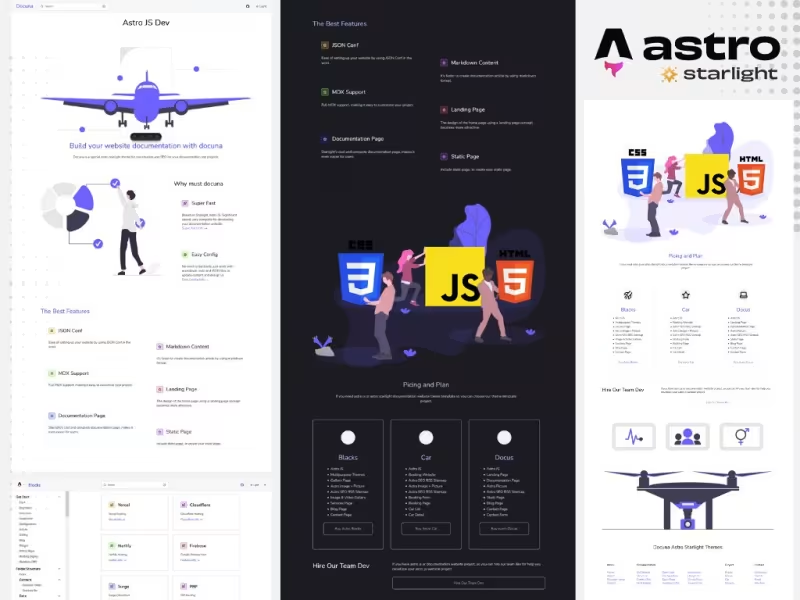
Table Of Content
- Introduction
- Overview of Docuna - Astro Starlight Docs Template - Documentation, Landing, Blog
- Overview of ForgeDocs — All-in-One Astro Starlight Theme for Landing Page, Documentation, and Blog
- Features Comparison
- Core Architecture and Astro Starlight Integration
- Design Systems and Visual Component Layouts
- Data Architecture: MDX-First vs JSON-Driven Configurations
- Search and Navigation Functionality
- Content Management System CMS Integration Options
- Search Engine Optimization SEO Capabilities
- Pricing
- Who Should Choose Docuna - Astro Starlight Docs Template - Documentation, Landing, Blog
- Who Should Choose ForgeDocs — All-in-One Astro Starlight Theme for Landing Page, Documentation, and Blog
- Verdict
- See It Live
- Related Themes
Introduction
Building modern software documentation requires balancing developer experience, site speed, and conversion goals. In past web architecture models, teams often split their public web assets across multiple systems: a marketing website managed on one platform, a blog on a headless content framework, and technical documentation hosted on dedicated docs portals. This fragmented approach introduced design inconsistencies, duplicated deployment pipelines, and increased maintenance overhead.
The emergence of static site generators built on modern JavaScript frameworks has fundamentally altered how technical documentation sites are constructed. Astro, paired with its official documentation toolkit Starlight, provides a foundation for content-focused websites. Starlight delivers static build outputs, lightweight assets, minimal client-side JavaScript, accessible typography, and keyboard-driven search out of the box. However, turning default Starlight installations into complete web properties that incorporate landing pages, blogs, and marketing sections requires pre-built themes tailored for these multi-purpose requirements.
In this technical comparison, we examine two premium themes designed for Astro Starlight: Docuna - Astro Starlight Docs Template - Documentation, Landing, Blog and ForgeDocs — All-in-One Astro Starlight Theme for Landing Page, Documentation, and Blog. Both themes aim to solve the challenge of running an all-in-one technical website, but they approach architecture, customization, data management, and user interface design from distinctly different angles. This analysis provides an objective side-by-side evaluation of their core features, implementation workflows, content structures, pricing models, and target use cases to help you select the optimal template for your project.
Overview of Docuna - Astro Starlight Docs Template - Documentation, Landing, Blog
Docuna is a streamlined documentation template built specifically on top of Astro and Starlight. Priced at $35, it serves as a lightweight starter kit designed to help developers publish static documentation websites paired with essential marketing and blogging pages. The project prioritizes rapid setup, standard Markdown/MDX authoring workflows, and clean UI defaults without adding complex abstractions over the underlying Starlight architecture.
The foundation of Docuna relies on Astro's static site output capabilities, ensuring minimal client-side JavaScript execution and fast page rendering speeds. It includes key out-of-the-box documentation features such as integrated keyboard search (Ctrl+K), responsive sidebar navigation with auto-generation support, custom dark and light mode theme toggles, and structured layout templates for home page landing sections and blog posts. Buyers receive 100% ownership of the raw source code via a one-time purchase, allowing full customizability across standard Astro layout files.
Getting started with Docuna follows traditional Node.js package setup protocols. Developers download and extract the project archive, run standard package manager installation commands, and edit local configuration files to set up site domains, global metadata, and nested documentation sidebars. Updating the hero layout, adding custom code examples, or extending content pages involves straightforward updates to local .astro component layouts and .mdx content directories. You can explore the implementation details directly on the official Docuna - Astro Starlight Docs Template - Documentation, Landing, Blog details page.
Overview of ForgeDocs — All-in-One Astro Starlight Theme for Landing Page, Documentation, and Blog
ForgeDocs is a comprehensive, production-oriented theme engineered to unify landing pages, technical documentation, and product blogs into a single cohesive Astro Starlight project. Priced at $79 as a one-time lifetime license, ForgeDocs emphasizes data-driven architecture, advanced UI styling, complete search engine optimization compliance, and optional headless content management integration via Decap CMS.
Architecturally, ForgeDocs differentiates itself by adopting a JSON-driven configuration model alongside standard MDX content files. Key sections of the landing page, promotional banners, feature blocks, and component layouts read directly from structured JSON datasets, enabling site updates without direct manipulation of core component code. The visual layout incorporates design elements inspired by Fluent UI and shadcn/ui components, delivering a clean, modern aesthetic suitable for SaaS products, open-source libraries, and enterprise developer tools.
Beyond visual component design, ForgeDocs comes equipped with deployment guides, full green SEO defaults, lifetime updates, unlimited project permissions, and support for Astro 7.3 features. Furthermore, ForgeDocs offers dedicated CMS capabilities through an optional Code + Decap CMS edition, permitting non-technical content creators to edit documentation and blog posts through an accessible browser panel interface. Additional specifications can be found on the official ForgeDocs — All-in-One Astro Starlight Theme for Landing Page, Documentation, and Blog page.
Features Comparison
Core Architecture and Astro Starlight Integration
Both Docuna and ForgeDocs are constructed on top of Astro and its Starlight documentation framework. This guarantees that both themes inherit Starlight's performance characteristics, including build-time static HTML generation, minimal client-side JavaScript payload sizes, automatic page routing, and built-in accessibility compliance.
Docuna maintains a close proximity to standard Starlight configurations. Developers who prefer traditional Astro project conventions will find Docuna's file structure familiar. Customizations are executed by editing .astro layouts, modifying standard astro.config.mjs files, and writing .mdx content directly. ForgeDocs, while retaining full compatibility with Starlight's core engines, introduces custom layout wrappers and supports Astro 7.3 capabilities. ForgeDocs structures core data into external JSON files to separate structural content from visual template logic.
Design Systems and Visual Component Layouts
Visual styling and component presentation represent major functional differences between the two themes. Docuna features a clean, functional UI template optimized primarily for readability, speed, and standard technical documentation layouts. Its landing page template provides essential hero sections, feature grids, and straightforward call-to-action sections suitable for open-source utilities or smaller software utilities.
ForgeDocs adopts a design system incorporating design patterns inspired by Fluent UI and shadcn/ui visual tokens. The result is a polished visual aesthetic tailored for commercial SaaS platforms and enterprise software documentation. ForgeDocs includes interactive UI components, structured promotional sections, badge notifications (such as version updates), refined code block renderings, and built-in dark/light mode switches.
Data Architecture: MDX-First vs JSON-Driven Configurations
Content and template customization methodologies diverge significantly across both templates:
- Docuna (MDX and Astro File Workflow): Customization relies on direct editing of source code files. Updating hero banners, modifying sidebar structures, or creating static marketing sections involves editing
.astropage files, configuration scripts, and writing.mdxcontent inside standard content collection directories. - ForgeDocs (Data-Driven JSON Architecture): Core sections of the landing page, feature highlights, navigation schemas, and promotional components are driven by structured JSON files. This separation allows developers and content operators to update landing page copy, pricing tables, or promotional text by modifying raw JSON arrays without refactoring HTML or Astro template files.
Search and Navigation Functionality
Search engine capabilities and navigation options are vital components of technical documentation systems. Docuna includes Starlight’s standard search modal (Ctrl+K) alongside responsive sidebar options. It supports automatic sidebar navigation generation based on directory folder structures, reducing the administrative burden of manually organizing multi-level technical guides.
ForgeDocs incorporates search indexing with support for expanded navigation elements across the documentation portal, blog section, and main landing pages. Its top navigation bar accommodates contextual action buttons (such as pricing links, version flags, and primary CTA buttons), while its sidebar supports complex nested navigation tiers tailored for large technical documentation projects.
Content Management System (CMS) Integration Options
Managing written content across development teams frequently requires flexible authoring workflows:
- Docuna: Operating entirely via standard file workflows, content management in Docuna occurs inside code repositories using local text editors or IDEs. Markdown (
.md) and MDX (.mdx) files are committed directly to version control systems (such as Git), making it well-suited for engineering-centric workflows. - ForgeDocs: Supports both file-based code editing and browser-based content management. ForgeDocs offers an optional Decap CMS package edition. This integration enables local and hosted CMS operations, allowing non-technical writers, marketers, and technical writers to write, edit, and publish blog articles and documentation pages through a web interface backed by Git synchronization.
Search Engine Optimization (SEO) Capabilities
Search engine visibility is essential for software platforms seeking organic traffic through technical documentation and content marketing. Docuna provides SEO-ready baseline meta tag structures, canonical URL generation, and structured HTML standard practices inherent to Astro static builds.
ForgeDocs emphasizes advanced "Full Green SEO" compliance out of the box. Its automated meta-data workflows generate structured open-graph tags, Twitter cards, canonical tags, automated XML sitemaps, and optimized image handling primitives tailored to maximize Lighthouse performance metrics and search engine indexation scores.
Pricing
When evaluating cost structures, both platforms offer single one-time payment models, eliminating recurring monthly software-as-a-service fees. However, their price points reflect distinct target audiences and feature scopes:
| Feature / Aspect | Docuna | ForgeDocs |
|---|---|---|
| Price | $35 (One-time purchase) | $79 (One-time purchase) |
| Source Code Ownership | 100% full source code ownership | Full source code ownership |
| License Scope | Standard single or multi-use license | Unlimited projects license |
| Updates | Core updates included | Lifetime updates included |
| CMS Capability | Git/MDX file workflow | Optional Decap CMS integration package |
| Design Engine | Standard Starlight / Custom Minimal | Fluent UI + shadcn design aesthetic |
| Configuration Approach | Astro & MDX files | Data-driven JSON configuration |
Docuna offers an entry price point of $35, making it an affordable selection for individual creators, open-source maintainers, and indie developers working on lightweight budgets. ForgeDocs carries a price of $79, justified by its inclusion of an unlimited project license, lifetime updates, JSON data abstractions, advanced design system integration, and optional Decap CMS workflow packages.
Who Should Choose Docuna - Astro Starlight Docs Template - Documentation, Landing, Blog
Docuna is specifically tailored for developers who prioritize simplicity, standard code structure, and rapid file-based setup. You should choose Docuna if your project matches the following user profiles:
- Open-Source Software Maintainers: Developers needing a clean, zero-fuss documentation portal paired with a simple landing page for an open-source library or CLI tool without complex setup requirements.
- Budget-Conscious Developers: Creators who want a high-performance documentation and blogging setup while keeping software infrastructure acquisition costs low ($35 one-time purchase).
- Pure MDX Workflow Enthusiasts: Technical teams who prefer writing all content, configuration rules, and layout modifications directly in standard Astro and MDX files without learning abstract JSON configuration layers.
- Minimalist Web Designers: Authors who prefer a standard, distraction-free visual layout where content takes center stage over elaborate marketing graphics or heavy visual component libraries.
Who Should Choose ForgeDocs — All-in-One Astro Starlight Theme for Landing Page, Documentation, and Blog
ForgeDocs is designed for teams building commercial products, SaaS applications, and multi-project platforms requiring high visual polish and flexible content editing. You should choose ForgeDocs if your project matches the following user profiles:
- Commercial SaaS Developers & Startups: Founders and software teams building commercial web apps who require a modern visual presence built on Fluent and shadcn design aesthetics to convert visitors into customers.
- Teams Requiring Headless CMS Support: Technical organizations where non-technical team members (such as marketing managers, technical writers, or community staff) need to draft and publish content via Decap CMS.
- Agencies & Serial Builders: Developers who build multiple client portals or product documentation sites and benefit directly from an unlimited project license with lifetime template updates.
- Data-Driven System Architects: Developers who prefer configuring landing page layouts, promotional components, and site menus through centralized JSON data files rather than manually editing component templates.
Verdict
Both Docuna and ForgeDocs deliver strong static site foundations built on top of Astro and Starlight. By choosing either option, development teams bypass weeks of tedious boilerplate configuration, establishing fast, accessible, search-indexed documentation sites paired with integrated blogs and landing pages.
Docuna succeeds as a focused, high-value template for developers seeking a standard Starlight foundation. Its $35 price point, raw MDX authoring workflow, simple local installation protocol, and clean visual default setup make it an excellent fit for indie projects, developer utilities, and straightforward technical documentation sites.
ForgeDocs, on the other hand, provides a broader suite of tools, advanced design components, and workflow abstractions. With its $79 price tag, it delivers an impressive package containing Fluent + shadcn styling, JSON-driven content configurations, complete green SEO optimization, lifetime updates for unlimited projects, and optional Decap CMS workflows. For commercial SaaS platforms, enterprise development tools, or teams requiring CMS access for non-technical writers, ForgeDocs justifies its higher investment.
If your primary objective is a simple, budget-friendly MDX setup, choose Docuna. If your goal is a commercial product site with rich visual components, data-driven layouts, and optional CMS workflows across multiple projects, choose ForgeDocs.
See It Live
Demo A: Docuna - Astro Starlight Docs Template - Documentation, Landing, Blog
Demo B: ForgeDocs — All-in-One Astro Starlight Theme for Landing Page, Documentation, and Blog
Related Themes
Explore more developer-focused templates and site themes at All Themes and inspect curated tools in the Premium Themes catalog.
← Docuna - Astro Starlight Docs Template - Documentation, Landing, BlogSecure Your Development Stack - Backdoors in Claude Code for VS Code Extension on Cursor Marketplace →
Need Custom?
Hire via Fiverr Escrow
72+ verified reviews, escrow protected.
ORDER CUSTOM →

