Docuna - Astro Starlight Docs Template - Documentation, Landing, Blog
Astro Starlight documentation template with landing page, blog, search, sidebar nav, dark mode. Fast, SEO ready, MDX, own 100% source, one-time.
astro • starlight • documentation-template • docs-template • astro-template • documentation-website • astro-docs • premiumthemes •
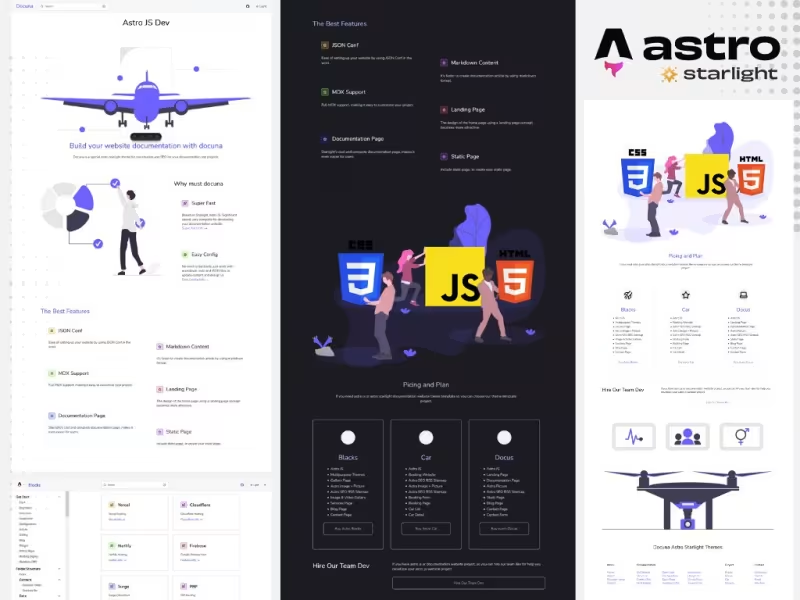
Table Of Content
- Introduction
- What is Docuna - Astro Starlight Docs Template - Documentation, Landing, Blog?
- Key Features
- Built on Astro and Starlight Architecture
- Integrated Landing Page, Blog, and Documentation Modules
- Built-in Search, Theme Switcher, and Navigation Controls
- MDX Content Support and Auto-Generated Code Displays
- Simple Node.js Installation and Setup Lifecycle
- Flexible Configuration for Domains and Sidebar Hierarchies
- 100% Source Ownership with One-Time Licensing
- Performance and SEO
- Pricing
- Who Is This For?
- Who Should Skip This?
- Verdict
- See It Live
- Related Themes
Introduction
Building a modern software documentation site often presents developers with a complex set of architectural trade-offs. While dedicated documentation frameworks excel at rendering Markdown files and generating table-of-contents navigation, they frequently lack built-in capabilities for promotional landing pages or integrated product blogs. Consequently, engineering teams often find themselves maintaining fragmented web architectures—deploying a separate framework for their marketing homepage, another tool for their technical blog, and a specialized documentation generator for their user guides. This multi-repository or multi-framework setup increases operational maintenance, creates inconsistent user interface designs, and complicates search engine optimization across domain routes.
On the other hand, attempting to build a custom documentation ecosystem entirely from scratch using general-purpose frontend frameworks requires significant initial labor. Developers must manually implement core documentation primitives: structured sidebar navigation, responsive layout grids, search indexing, theme toggling for dark and light modes, keyboard shortcuts, and code block formatting. Spending development cycles assembling these baseline publishing features distracts engineering teams from writing high-quality technical content and refining core software products.
The ideal middle ground is a structured, production-ready starter template that unifies product landing pages, technical documentation, and blog functionality into a single fast codebase. By leveraging modern static site generation tools, teams can achieve rapid page rendering speeds, complete search engine visibility, and easy maintenance through simple Markdown or MDX files. Solution architectures like Docuna - Astro Starlight Docs Template - Documentation, Landing, Blog address these common development hurdles by supplying a complete, unified foundation out of the box.
What is Docuna - Astro Starlight Docs Template - Documentation, Landing, Blog?
Docuna is a comprehensive documentation theme built directly upon the Astro static site framework and the Starlight documentation ecosystem. Designed specifically to accelerate the launch of technical documentation portals, Docuna combines a dedicated landing page layout, a full-featured technical blog, and a documentation engine within a single project repository. Built for performance and clarity, the template delivers static HTML output with minimal JavaScript overhead, ensuring that doc pages load almost instantaneously for developers seeking quick technical references.
At its core, Docuna harnesses the strength of Astro and Starlight to streamline content publishing using standard Markdown and MDX (Markdown for JSX). This enables writers and engineers to author technical guides using familiar text formats while retaining the flexibility to embed interactive components or custom code snippets directly inside documentation pages. The template ships with essential UI patterns pre-configured, including a structured sidebar navigation hierarchy, an integrated search overlay activated via keyboard shortcuts, and dark/light/auto theme switcher controls.
Unlike hosted software-as-a-service documentation platforms that impose recurring monthly fees, platform lock-in, or constrained customization interfaces, Docuna provides complete access to its source code under a simple one-time purchase model. Developers receive 100% ownership of the repository files, allowing them to host the resulting site on any static web platform, customize styles to match corporate branding, and integrate custom build steps or CI/CD pipelines as needed.
Whether you are launching an open-source library, a commercial API service, an internal developer platform, or a developer-focused SaaS product, Docuna offers the structure needed to present technical information effectively. It eliminates the boilerplate configuration work typically required to set up Astro and Starlight projects, allowing teams to go from raw repository code to a deployed web portal in a matter of minutes.
Key Features
Built on Astro and Starlight Architecture
Docuna relies on the powerful combination of Astro and Starlight to deliver an efficient static publishing platform. Astro's island architecture ensures that pages are rendered as light static HTML by default, stripping out unnecessary client-side JavaScript execution. Starlight provides the specialized documentation layer, offering standardized components for layout grids, header bars, and document structure. This foundation guarantees optimal loading speeds, strict adherence to web accessibility standards, and clean semantic DOM structures that search engines can easily index.
Integrated Landing Page, Blog, and Documentation Modules
Unlike minimal docs-only templates, Docuna provides a complete site architecture that includes a dedicated marketing landing page, an engineering blog module, and standard documentation routes. The included landing page allows teams to highlight key software features, display value propositions, and direct users straight into the documentation or code repository. The integrated blog system gives teams a native platform to publish product updates, changelogs, tutorials, and technical articles without needing an external CMS or secondary domain.
Built-in Search, Theme Switcher, and Navigation Controls
User experience in technical documentation depends heavily on fast navigation and quick content discovery. Docuna features an integrated search modal accessible directly from the header or triggered instantly via the standard Ctrl+K (or Cmd+K) keyboard shortcut. Furthermore, the template includes a theme selection menu allowing users to explicitly toggle between Dark mode, Light mode, or align automatically with system OS preferences. The navigation bar also features direct GitHub project links, contextual page headers, and persistent section links to keep users oriented.
MDX Content Support and Auto-Generated Code Displays
Docuna natively supports MDX, enabling content authors to mix Markdown syntax with rich component logic inside document files. This flexibility allows teams to output clean technical text while easily rendering tabbed code examples, custom callout boxes, and interactive UI components. The template's syntax engine automatically formats example code blocks, ensuring clean visual hierarchy for multiple programming languages. Authors can structure complex technical guides with minimal formatting overhead while maintaining high visual consistency.
Simple Node.js Installation and Setup Lifecycle
Deploying Docuna follows a straightforward, standard Node.js development workflow. Developers begin by downloading Node.js and extracting the Docuna source project files onto their local workspace. From there, running standard package manager commands (such as npm install or pnpm install) installs all necessary project dependencies. Launching the local development server with npm run dev enables instant real-time previews, making it easy to configure environments, review live changes, and verify code implementations before pushing updates to production hosting services.
Flexible Configuration for Domains and Sidebar Hierarchies
Customizing Docuna to match specific project structures is managed through central configuration files. Developers can easily map custom domain names, configure base site paths, and establish customized meta tags for social previews. The documentation sidebar navigation can be configured manually or set up to automatically generate navigation structures based on file directory hierarchies. This structural flexibility allows small projects to start with simple linear guides while permitting large technical ecosystems to build multi-nested documentation trees.
100% Source Ownership with One-Time Licensing
A major advantage of Docuna is its distribution model. Purchasing Docuna provides complete access to the raw template source code with zero ongoing subscription costs. Organizations retain full ownership of their repository files, allowing total control over styling modifications, custom script additions, third-party tool integrations, and hosting server choices. There are no vendor lock-in restrictions, arbitrary traffic caps, or third-party user limits, making it a reliable solution for long-term project planning.
Performance and SEO
Performance and search engine visibility are critical factors for developer documentation sites. When software engineers search for API endpoints, configuration flags, or error resolutions, documentation pages must load rapidly and display precise answers immediately. Docuna excels in both areas due to its reliance on Astro’s static HTML generation pipeline.
Because Astro outputs pre-rendered static HTML files during the build phase, Docuna eliminates server-side processing bottlenecks and cold-start latency associated with dynamic backend servers. Client-side JavaScript execution is kept to an absolute minimum, ensuring that the DOM renders rapidly even on low-powered mobile devices or congested networks. Page transitions are crisp, layout shifts are minimized, and core performance metrics achieve high standard scores.
From an SEO perspective, Docuna is structured to maximize document indexability. Static HTML rendering means search engine crawlers receive fully populated page content upon initial request, without relying on client-side rendering or heavy script execution. The template automatically generates semantic markup for document hierarchies, page headings, canonical routes, and structural meta data. Furthermore, the inclusion of a dedicated blog system and landing page on the same domain context consolidates domain authority, helping all published guides, tutorials, and technical updates rank effectively in organic search results.
Pricing
Docuna is available for a straightforward, single payment of $35. This flat-fee structure provides immediate access to the full template repository, including the landing page code, blog layout engines, documentation UI components, search setups, and theme switching controls.
Unlike software-as-a-service documentation tools that charge monthly per-user or per-document fees, Docuna involves no recurring charges, tier upgrades, or hidden costs. Purchasing the template grants full usage rights for your project, allowing engineering teams to host their documentation on any static deployment platform—such as GitHub Pages, Cloudflare Pages, Vercel, Netlify, or custom web servers—without incurring additional template licensing costs over time.
Who Is This For?
Docuna is specifically engineered to cater to technical professionals, software development organizations, and content creators who require a robust publishing stack without unnecessary setup friction:
- Open-Source Software Maintainers: Project leaders who need a professional digital presence that combines an attractive project homepage, comprehensive reference documentation, and a news blog in a single, easy-to-host repository.
- Engineering and API Teams: Product teams launching commercial developer tools, SaaS APIs, SDKs, or technical frameworks that demand fast, structured documentation paired with search functionality and clear code formatting.
- Astro and Frontend Developers: Developers familiar with modern JavaScript toolchains who want to leverage Astro and Starlight’s performance advantages while skipping the initial setup and design work required for custom themes.
- Technical Writers and Content Strategy Teams: Authors seeking an MDX-driven publishing engine that allows them to focus purely on drafting high-quality technical content, guides, and tutorials using version-controlled Markdown workflows.
Who Should Skip This?
While Docuna offers a flexible technical framework, certain project types may be better served by alternative solutions:
- Non-Technical Content Editors: Users looking for a non-technical, visual drag-and-drop website builder or visual CMS interface may find Docuna's code-first workflow—requiring terminal operations, Node.js environment setup, and Markdown editing—unfamiliar.
- Enterprise Teams Requiring Hosted SaaS Portals: Organizations that specifically mandate fully managed, hosted documentation platforms with built-in user access permissions, graphical inline editing, and legacy enterprise software contracts.
- Projects Requiring Complex Dynamic Databases: Sites whose core function relies heavily on client-side real-time data streaming or complex dynamic user database management rather than static document rendering.
Verdict
Docuna - Astro Starlight Docs Template - Documentation, Landing, Blog provides a practical, high-performance solution for anyone looking to build a modern documentation portal. By pairing the speed of Astro with the technical layout capabilities of Starlight, the template successfully eliminates the typical trade-off between technical functionality and landing page presentation.
The inclusion of out-of-the-box features like Ctrl+K search modal navigation, theme switching (dark/light/auto), native MDX support, and an integrated blog engine makes Docuna an outstanding value at its $35 price point. Because buyers receive 100% source code ownership with zero monthly subscription fees, the template serves as a scalable, cost-effective long-term asset for open-source projects and commercial developer tools alike.
For engineering teams looking to accelerate their documentation setup without sacrificing control over performance, design, or source code, Docuna delivers an exceptionally solid foundation ready for immediate deployment.
See It Live
Read the full theme details at Docuna - Astro Starlight Docs Template - Documentation, Landing, Blog.
Try the demo: Demo
Related Themes
Explore more at All Themes and Premium Themes.
← Finance App - Astro Startup Template - SaaS, Finance, App Landing vs Astro Car Rental Template - Car Booking, Fleet, Reservation Website - Which Is Better?Secure Your Development Stack - Backdoors in Claude Code for VS Code Extension on Cursor Marketplace →
Need Custom?
Hire via Fiverr Escrow
72+ verified reviews, escrow protected.
ORDER CUSTOM →

