Mobile JAMSTACK website themes template
Free download and open source code Mobile JAMSTACK website blog themes template.
themestemplate • website-themes • website-template • blog-themes • blog-template • ionic-themes • ionic-template • jamstack-themes • jamstack-template • eleventy • 11ty • themes • template • eleventythemes • ionicthemes • jamstackthemes • freethemes •
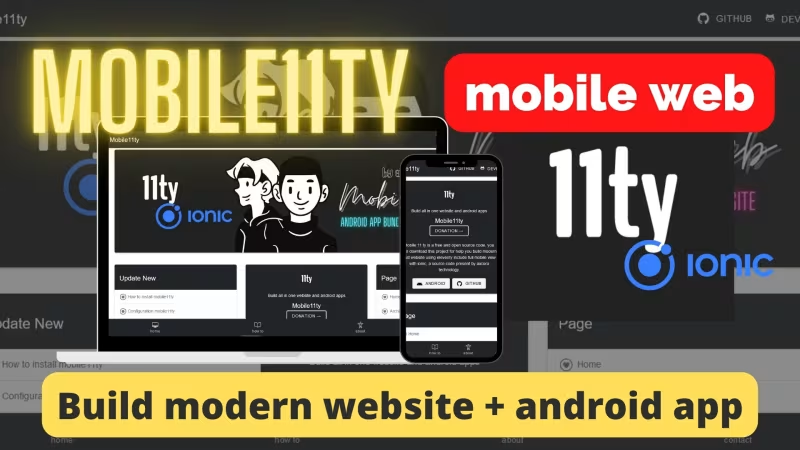
Mobile JAMSTACK website themes template
Documentation
How to install and work with JAMSTACK mobile website Themes project.
Local Installation
- Download and install Node JS on your devices
- Download Source Code Project
- Create New folder on desktop name it with your project.
- Extract source code files in to your project
- Access with terminal run 'cd C:\Users\pcname\Desktop\yourproject' change pcname with your pc name and change yourproject with your new project.
- Run Installation with Terminal
npm install && npm start - Open localhost:8080
- For stop , you can presh ctrl+C
Work with Eleventy 11ty themes template
- For update pages you can visit on posts folder and update .md files
Push On Github
- Create account on github
- Create new repo and name it with your project
- Visit your github repo and copy paste all command on your project folder in to your terminal.
- run this command `git init && git add . && git commit -m "my first commit" && git remote add origin https://github.com/username/myrepo
git push -u origin main` need to change username with your github username , and myrepo with your repo project name , and main with your github repo default branch for example main or master - check on your github repo.
Make your website online
- You can use neltify , vercel , cloudflare pages for deploy your eleventy website blog project - recommended.
- Create account with your github account on vercel ,netlify , cloudflare ,then create new project on vercel / netlify , for cloudflare you can create new cloudflare pages.
- After you have create new project now you can integration your github repo, select your repo project, and select eleventy framework , then click deploy.
- Congratulations your JAMSTACK ionic website is live now !!
Production build for PHP Hosting
If you want to run on your PHP hosting like cpanel, plesk,direct admin , apanel , VPS and others. So you need to build production mode for your project.
Run npm run build and upload your build production _site folder into your hosting.
But we recommended to you for use modern static hosting.
Documentation detail and IDE online :
https://www.hockeycomputindo.com/2022/04/new-mobile11ty-eleventy-build-website.html
Thank You by using JAMSTACK mobile themes template project
We hope with this source code you can build modern website blog for your project.
URL: https://www.hockeycomputindo.com/themes/eleventy/mobile-jamstack/
Embed — Cloudinary
Mobile JAMSTACK website themes template
https://www.hockeycomputindo.com/themes/eleventy/mobile-jamstack/
DOWNLOAD →Own 100%
Mobile JAMSTACK website themes templateFree download and open source code Mobile JAMSTACK website blog themes template.
DOWNLOAD →DEMO →Features
node-js
js-lang
seo-focus
mobile-themes
eleventy-11ty
ionic-framework
jamstack
static-site-generator
modern-host-support-netlify-vercel-cloudflare-and-others
build-production-host-firebase-surge-cpanel-vps-direct-admin-plesk-and-others
← Portfolio Web and UI Designer themes templateCool 11ty eleventy website themes template →
Need Custom?
Hire via Fiverr Escrow
72+ verified reviews, escrow protected.
ORDER CUSTOM →Selected Themes
A focused collection, not a marketplace.

Custom Web Architecture
Escrow Protected
Headless Commerce, Booking OS, SSG & Vision AI - Custom built for your business - Commerce, Booking, SSG, AI - Built to own, not rented.
Own 100% .NET Engine - 12ms Build No Lock
Slow builds & rented platform? DAX .NET 8 static builder - 12ms compile, zero bloat, single binary, immutable infra you control forever. Own source, not subscription.
Order Now -> 02 — AI AutomationForensic Self-Hosted AI - Vision Finance & Autoblog
Stop giving data to cloud. SAEDI Vision runs on your infra - forensic audit trail, vision intelligence, finance automation, 100% auditable. Own pipeline & data.
Order Now -> 03 — Static Site GeneratorPython-First SSG - No Ruby Node Headache
Sick of gem & npm conflicts? Pycora is Python-native - own your pipeline, no dependency hell, no Jekyll, no Astro, just clean Python build.
Order Now ->