Choosing Between Docuna - Astro Starlight Docs Template - Documentation and Landing and Docus - Astro Starlight Docs Template - Documentation, Blog, Landing? Read This First
Compare Docuna and Docus Astro Starlight documentation templates. Discover differences in features, pricing, blogging capabilities, and layout options.
astro • starlight • documentation-template • docs-template • blog-template • astro-template • documentation-website • astro-docs •
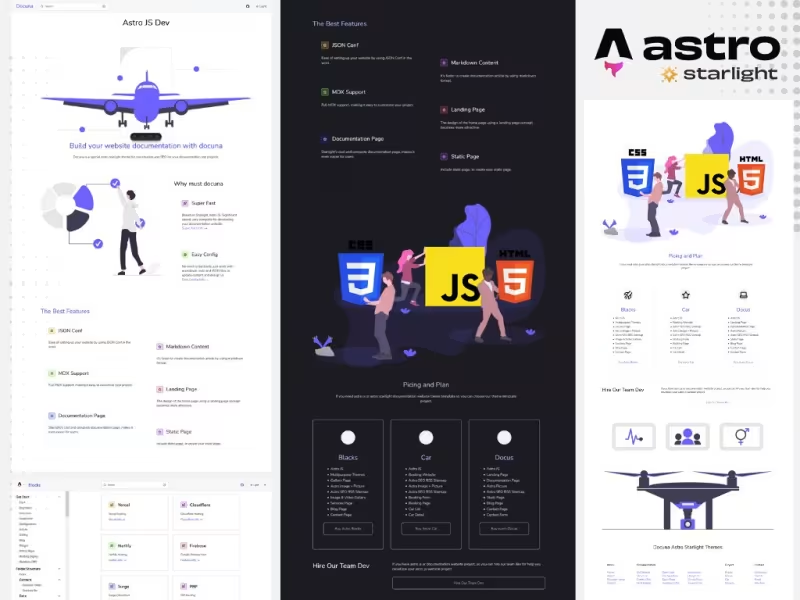
Table Of Content
- Introduction
- Overview of Docuna - Astro Starlight Docs Template - Documentation and Landing
- Overview of Docus - Astro Starlight Docs Template - Documentation, Blog, Landing
- Features Comparison
- Content Architecture and MDX Integration
- Landing Page Capabilities and Layout Options
- Blogging Engine and Content Taxonomy
- Sidebar Navigation and Group Indexing
- Form Handling, Custom Pages, and Data Configuration
- Search Capabilities and Dark Mode Styling
- Pricing
- Who Should Choose Docuna - Astro Starlight Docs Template - Documentation and Landing
- Who Should Choose Docus - Astro Starlight Docs Template - Documentation, Blog, Landing
- Verdict
- See It Live
- Related Themes
Introduction
Building a modern documentation site requires balancing performance, developer experience, and maintainability. In the Jamstack ecosystem, Astro has emerged as a premier web framework for content-focused websites, while its official documentation framework, Starlight, provides a foundation for structured docs. However, starting from a bare Starlight installation often leaves developer teams needing to build custom landing pages, search configurations, navigation layouts, and marketing pages from scratch.
Choosing the right starter theme accelerates deployment by providing pre-designed components and tested project structures. Two prominent options available for developer teams are Docuna - Astro Starlight Docs Template - Documentation and Landing and Docus - Astro Starlight Docs Template - Documentation, Blog, Landing. Both solutions leverage Astro and Starlight to deliver static site output, minimal client-side JavaScript, dark mode toggling, and fast page load speeds.
While both templates share the core Astro Starlight engine, their scope, targeted use cases, and content architectures differ significantly. Docuna focuses on delivering a lean documentation portal paired with a clean product landing page. Docus expands upon this foundation by adding a full-featured blogging engine with tags and categories, a dedicated pricing page, contact form support, and structured data handling via JSON. This article provides an architectural and functional comparison to help technical leads, developers, and product managers select the ideal template for their project requirements.
Overview of Docuna - Astro Starlight Docs Template - Documentation and Landing
Docuna is designed as a focused, lightweight documentation theme constructed specifically for teams that require a clean documentation repository alongside a product landing page. Built directly on Astro and Starlight, Docuna prioritizes static site output, minimal JavaScript overhead, and clean codebase organization. It eliminates unnecessary abstractions, allowing developers to own 100% of the source code upon purchase through a simple one-time payment model.
The core value of Docuna lies in its streamlined setup process and core feature set. It incorporates a pre-configured landing page hero section, feature callout grids, auto-generating sidebar navigation, built-in site search via Starlight's keyboard-accessible search modal (Ctrl+K), and automated theme toggling covering dark mode, light mode, and system preference options. Developers write their technical documentation using standard Markdown or MDX, benefiting from Astro's native content collection features.
Configuring Docuna involves straightforward steps: downloading the Node.js project files, running local installation commands, updating domain parameters, and editing the sidebar and landing page layouts through configuration files. For projects that do not require continuous blog updates or complex transactional landing pages, Docuna offers an affordable, unencumbered foundation that reduces maintenance overhead while maintaining performance metrics.
Overview of Docus - Astro Starlight Docs Template - Documentation, Blog, Landing
Docus is positioned as a comprehensive documentation and content publishing system for Astro Starlight. It expands beyond traditional technical docs by providing an all-in-one template capable of powering an entire product website. Alongside its core documentation section, Docus incorporates a fully integrated blogging system equipped with tag indexing, category filtering, and pagination support.
Beyond documentation and blogging, Docus comes built with additional structural pages designed for product marketing and client communication. It includes a structured landing page, a dedicated pricing tier page, contact form integration logic, and customizable static page layouts suitable for pages such as About Us or Order confirmation views. The template also supports custom group index pages featuring visual content cards, helping readers navigate complex multi-topic documentation hierarchies.
Data and content in Docus are managed through a hybrid approach of standard MDX files and structured JSON configuration files. Like Docuna, Docus provides 100% source code ownership under a one-time purchase, without recurring platform fees. Its automatic search indexing, dark mode controls, auto-generated SEO metadata, and extensible folder organization make it suitable for technical teams building software products that require technical documentation alongside an active developer blog and marketing funnel.
Features Comparison
Content Architecture and MDX Integration
Both Docuna and Docus rely on Astro's native content collections and Starlight's MDX engine to parse documentation files. Developers can embed interactive components, custom callouts, code syntax highlighting, and custom UI components directly within Markdown files.
Docuna maintains a minimalistic content structure. Documentation files reside within standard content directories, and routing directly corresponds to file paths. This keeps the build pipeline fast and straightforward. For teams who exclusively need technical documentation with standard typography and code block formatting, Docuna provides a clean canvas without extra schema setup.
Docus enhances this architecture by extending content collections to handle multiple data types. In addition to handling standard documentation pages, Docus leverages MDX and JSON files to power blog posts, category archives, pricing tables, and static page templates. This hybrid content architecture enables non-documentation pages to pull structured properties from JSON files while leveraging MDX for rendered page content.
Landing Page Capabilities and Layout Options
The landing page serve as the primary entry point for both templates, but their component layout approaches differ in scope.
Docuna provides a focused hero section, value proposition grids, and call-to-action sections optimized for technical products. Its landing page template is engineered to direct visitors quickly into the documentation section or toward an external code repository like GitHub. Updating the landing page in Docuna requires minimal customization in the template code, keeping maintenance simple for developers who prefer straightforward static HTML/Astro components.
Docus includes a more detailed landing page design that integrates directly with its extended site structure. The landing page features clear navigation links leading to the Docs, Blog, and Pricing pages. In addition to standard call-to-action blocks, Docus includes component layouts designed to showcase product feature highlights, pricing plans, and quick links to documentation sub-groups.
Blogging Engine and Content Taxonomy
The inclusion of a native blogging system represents one of the primary functional differences between Docuna and Docus.
Docuna does not include a blog engine out of the box. It is designed explicitly for technical documentation and single landing page deployments. Teams using Docuna who later decide to add a blog must either build custom Astro routes, manage content collections manually, or host their blog on a separate sub-domain or platform.
Docus ships with a complete, fully configured blogging engine built directly into the template. The blog system supports metadata attributes including publication dates, author details, feature images, categories, and tags. It includes built-in category listing pages, tag collection views, and configurable pagination for handling growing content archives. This built-in taxonomy allows marketing and engineering teams to publish changelogs, product tutorials, engineering updates, and feature announcements within the same deployment asset as their core docs.
Sidebar Navigation and Group Indexing
Navigation within technical documentation determines how effectively users can discover information. Both templates inherit Starlight's sidebar navigation model, but implement grouping and indexing differently.
Docuna supports automated sidebar generation based on directory structures alongside manual configuration files. Users can define nested navigation groups, ordering rules, and external repository links. Docuna's navigation focuses on linear, hierarchical doc paths, making it suitable for standard API reference manuals, software guides, and developer handbooks.
Docus expands on sidebar navigation by offering dedicated group index pages with visual cards. Instead of relying solely on collapsible sidebar lists, Docus enables developers to build top-level directory landing pages where content categories are rendered as interactive cards. This approach improves visual navigation for expansive documentation suites that span multiple distinct software modules, SDKs, or API versions.
Form Handling, Custom Pages, and Data Configuration
Handling user communication and static informational pages requires specific component abstractions.
Docuna keeps static pages simple. Additional pages can be added by placing standard .astro or .mdx files into the pages directory. However, Docuna does not include default templates for forms, complex pricing tables, or extended static sub-pages out of the box.
Docus includes pre-configured layouts for specialized static pages, including About pages, custom Order pages, and a functional contact form integration pattern. Furthermore, Docus utilizes JSON configuration files alongside MDX frontmatter to manage structured data throughout the site. This approach allows developers to modify site-wide properties, pricing tiers, navigation items, and form settings without editing deep component markup.
Search Capabilities and Dark Mode Styling
User accessibility and site search are foundational elements of both themes, maintained through Astro Starlight's underlying architecture.
Both themes provide an integrated site search interface accessible via keyboard shortcuts (Ctrl+K or Cmd+K). Search indexing occurs during static site compilation, scanning document titles, headings, and body content to deliver client-side search results without external database dependencies.
Dark mode support is identical in both themes. Both templates include a theme toggle drop-down menu allowing visitors to switch between Dark, Light, and System Auto settings. The color schemes are designed to adhere to web accessibility standards, ensuring clear code syntax highlighting, high typography contrast, and legible UI controls in both lighting modes.
Pricing
When selecting a developer template, budget and long-term ownership models are critical factors. Both Docuna and Docus are offered under a one-time purchase model with 100% source code ownership and zero ongoing subscription fees.
| Feature / Aspect | Docuna | Docus |
|---|---|---|
| Price | $35 (One-time) | $65 (One-time) |
| Source Code Ownership | 100% Full Ownership | 100% Full Ownership |
| Recurring Fees | None | None |
| Core Purpose | Documentation + Landing | Docs + Blog + Landing + Pricing |
| Blogging Included | No | Yes (Tags, Categories, Pagination) |
| Specialized Pages | Landing Page, Docs | Landing, Docs, Blog, Pricing, Contact |
| Data Configuration | Astro / Starlight Config | JSON + MDX Hybrid Config |
Docuna is priced at $35, making it an economical choice for open-source project leads, independent developers, or small teams focused solely on launching technical documentation and a product landing page without additional platform overhead.
Docus is priced at $65, reflecting its expanded scope. The additional $30 investment accounts for the pre-built blogging platform, tag and category indexers, pricing page component templates, contact form logic, card-based group index templates, and expanded JSON configuration schemas.
Who Should Choose Docuna - Astro Starlight Docs Template - Documentation and Landing
Docuna - Astro Starlight Docs Template - Documentation and Landing is tailored for developers and organizations that require a focused documentation hub without unnecessary features.
- Open-Source Maintainers: Developers launching open-source libraries, CLI tools, or framework plugins who need a clean landing page linked to accessible technical documentation.
- Budget-Conscious Teams: Development teams operating under strict budget constraints who require a low-cost ($35) technical documentation solution with zero maintenance overhead.
- Projects with External Blogs: Organizations that already maintain a blog on a separate platform (such as Hashnode, Medium, or a custom CMS) and only need a dedicated documentation domain.
- Minimalist Software Engineers: Developers who prefer lightweight codebases with minimal structural files, ensuring fast build times and straightforward local maintenance.
Who Should Choose Docus - Astro Starlight Docs Template - Documentation, Blog, Landing
Docus - Astro Starlight Docs Template - Documentation, Blog, Landing is designed for creators, startups, and agencies requiring a full-featured product site built into a single deployment pipeline.
- SaaS Founders and Product Teams: Creators launching commercial software products who need documentation, a product landing page, a tier-based pricing page, and a contact form under one unified web repository.
- Content Marketers and Developer Advocates: Teams planning to publish developer tutorials, release notes, engineering blogs, and product updates alongside official technical documentation.
- Agencies Building Client Portals: Consultancy teams looking for a multi-page client portal template that supports custom static pages, group index cards, and JSON-driven site configurations.
- Complex API and SDK Platforms: Technical projects requiring multi-topic navigation where card-based group index pages help organize deep documentation trees.
Verdict
Both Docuna and Docus deliver robust static performance, modern dark mode UI styling, and fast build times powered by Astro and Starlight. The decision between them depends on your project's architectural scope and long-term content strategy.
If your primary goal is to deploy clean technical documentation paired with a fast product landing page, Docuna offers an ideal, cost-effective platform at $35. It eliminates unnecessary complexity, leaving you with an easy-to-maintain codebase focused purely on technical docs.
If your product strategy requires a complete web presence—including an integrated engineering blog with tags and categories, a dedicated pricing matrix, contact form integration, and structured card navigation—Docus justifies its $65 price point. It saves dozens of development hours by delivering a fully integrated content platform inside a single Astro project.
See It Live
Explore the live demos to evaluate page layouts, navigation speed, and design styling:
Demo A: Docuna - Astro Starlight Docs Template - Documentation and Landing
Demo B: Docus - Astro Starlight Docs Template - Documentation, Blog, Landing
Related Themes
Discover more developer templates and technical documentation starter kits at All Themes and Premium Themes.
← Head-to-Head: Docuna - Astro Starlight Docs Template - Documentation and Landing vs Blacks - Astro Multipurpose Template - Portfolio, Gallery, Blog, Landing for Modern WebsitesFinance App - Astro Startup Template - SaaS, Finance, App Landing vs Astro Car Rental Template - Car Booking, Fleet, Reservation Website - Which Is Better? →
Need Custom?
Hire via Fiverr Escrow
72+ verified reviews, escrow protected.
ORDER CUSTOM →

