Minimals Nikola SEO
Free download template nikola themes minimalist and clean with auto SEO support.
themestemplate • website-themes • website-template • blog-themes • blog-template • themes • template • blog • frontend • clean • minimalist • unique • python • nikola • pythonthemes • nikolathemes • jamstackthemes • freethemes •
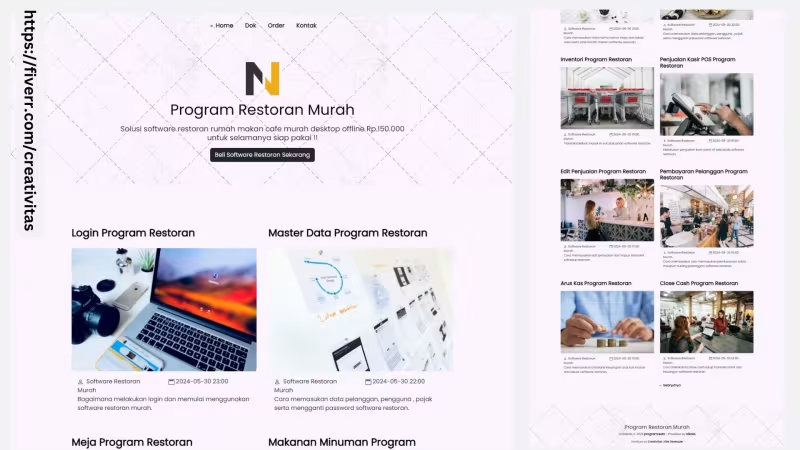
Minimals Nikola SEO
Build your website blog and docs project with JAMSTACK Python tech using Nikola
What is Nikola ??
In goes content, out comes a website, ready to deploy. Nikola is written in Python
Installation
Before start with this project you need to install python and nikola static site generator.
Install Python
First you need to download and install python in to your devices, how to install python in to mac , windows or linux you can read python documentation,you can skip this step if you have install python in to your device.
Install PIP
Afer download and install python , now we need to install PIP too.. , how to install pip you can read pip documentation , you can skip this step if you have install PIP in to your device.
Install Nikola
Next we need to install nikola in your devices
- Install Nikola Enviroment run
py -m venv nikola-env - Stop your python terminal and switch back again to bash terminal
- Access your nikola enviroment run
cd nikola-env - Install pip setup run
Scripts\python -m pip install -U pip setuptools wheel - Install Nikola extras run
Scripts\python -m pip install -U "Nikola[extras]" - Activate nikola script run
Scripts\nikola - Activate Env run
Scripts\activate - Check Nikola run
nikola
New Installation
Now we can create a new nikola project , open terminal and run nikola init --demo mysite
- Access your new nikola project run
cd mysite - Now, we need to build it run
nikola build - Next you can run on your devices and run
nikola auto --browser - Open
Localhost:8000
Themes Installation
Quick Start
- Download source code nikola minimals
- Open nikola-env\Lib\site-packages\nikola\data\themes
- Upload minimals to themes folder
- Back in to your project folder and open
conf,py - Change default themes with minimals,
THEME = "minimals"and save - Build production mode
nikola build - Run Dev mode
nikola auto --browser - Open
localhost:8000
Download and Install from github repo
Alternative you can clone from our github repo, for first access on nikola-env\Lib\site-packages\nikola\data\themes and now we need to create new folder call it minimals run terminal mkdir minimalsnext you can easy run clone form github git clone https://github.com/mesinkasir/minimals-nk.git
Test Run Minimals Themes
Now we can try to run this themes with run nikola build after that run nikola auto --browser and open localhost:8000
Congratulations, you have activate the minimals new nikola themes
Setup Your Site
Now we need to setup your site, so let's get started !!
open conf.py and customise with your needs.
Or you can copy and paste this code in to your conf.py then customise and save.
import time
BLOG_AUTHOR = "your web blog author here.." # (translatable)
BLOG_TITLE = "Your title website goes here...." # (translatable)
SITE_URL = "https://www.hockeycomputindo.com/"
BLOG_EMAIL = "hockeycorpmarketing@gmail.com"
BLOG_DESCRIPTION = "Your description website goes here....." # (translatable)
LOGO_URL = "/images/nik.png"
FAVICON = "/images/nik.png"
DEFAULT_LANG = "id"
FAVICONS = (
("icon", "/favicon.ico", "16x16"),
("icon", "/images/nik.png", "128x128"),
)
TWITTER_CARD = {
'use_twitter_cards': True,
'card': 'summary',
'site': '@website',
'creator': '@yourtwitterusername', # insert your twitter url here
}
TRANSLATIONS = {
DEFAULT_LANG: "",
# Example for another language:
# "es": "./es",
}
TRANSLATIONS_PATTERN = '{path}.{lang}.{ext}'
# Setup Your Navigation Link
NAVIGATION_LINKS = {
DEFAULT_LANG: (
("/", "Home"),
("/pages/dokumentasi/", "Dok"),
("/pages/beliprogramrestoran/", "Order"),
("/pages/kontak/", "Kontak"),
),
}
NAVIGATION_ALT_LINKS = {
DEFAULT_LANG: ()
}
# Install the Minimals Themes on your Nikola Project
THEME = "minimals"
THEME_COLOR = '#5670d4'
THEME_CONFIG = {
DEFAULT_LANG: {
# Show the latest featured post in a large box, with the previewimage as its background.
'featured_large': False,
# Show the first (remaining) two featured posts in small boxes.
'featured_small': False,
# Show featured posts on mobile.
'featured_on_mobile': True,
# Show image in `featured_large` on mobile.
# `featured_small` displays them only on desktop.
'featured_large_image_on_mobile': True,
# Strip HTML from featured post text.
'featured_strip_html': False,
# Contents of the sidebar, If empty, the sidebar is not displayed.
'sidebar': ''
}
}
POSTS = (
("posts/*.rst", "posts", "post.tmpl"),
("posts/*.md", "posts", "post.tmpl"),
("posts/*.txt", "posts", "post.tmpl"),
("posts/*.html", "posts", "post.tmpl"),
)
PAGES = (
("pages/*.rst", "pages", "page.tmpl"),
("pages/*.md", "pages", "page.tmpl"),
("pages/*.txt", "pages", "page.tmpl"),
("pages/*.html", "pages", "page.tmpl"),
)
TIMEZONE = "Asia/Bangkok" # Change with your time UTC
COMPILERS = {
"rest": ['.rst', '.txt'],
"markdown": ['.md', '.mdown', '.markdown'],
"textile": ['.textile'],
"txt2tags": ['.t2t'],
"bbcode": ['.bb'],
"wiki": ['.wiki'],
"ipynb": ['.ipynb'],
"html": ['.html', '.htm'],
"php": ['.php'],
}
HIDDEN_TAGS = ['mathjax']
CATEGORY_ALLOW_HIERARCHIES = False
CATEGORY_OUTPUT_FLAT_HIERARCHY = False
HIDDEN_CATEGORIES = []
HIDDEN_AUTHORS = ['Guest']
FRONT_INDEX_HEADER = {
DEFAULT_LANG: ''
}
ATOM_FILENAME_BASE = "feed"
REDIRECTIONS = []
GITHUB_SOURCE_BRANCH = 'src'
GITHUB_DEPLOY_BRANCH = 'master'
GITHUB_REMOTE_NAME = 'origin'
GITHUB_COMMIT_SOURCE = True
GALLERIES_USE_THUMBNAIL = False
GALLERIES_DEFAULT_THUMBNAIL = None
IMAGE_FOLDERS = {'images': 'images'}
INDEX_READ_MORE_LINK = ''
FEED_READ_MORE_LINK = '{read_more}… ({min_remaining_read})
'
FEED_LINKS_APPEND_QUERY = False
LICENSE = ""
# For change your footer copyrights
CONTENT_FOOTER = 'Contents © {date} {author} - Powered by Nikola{license}'
CONTENT_FOOTER_FORMATS = {
DEFAULT_LANG: (
(),
{
"email": BLOG_EMAIL,
"author": BLOG_AUTHOR,
"date": time.gmtime().tm_year,
"license": LICENSE
}
)
}
RSS_COPYRIGHT = 'Contents © {date} {author} {license}'
RSS_COPYRIGHT_PLAIN = 'Contents © {date} {author} {license}'
RSS_COPYRIGHT_FORMATS = CONTENT_FOOTER_FORMATS
COMMENT_SYSTEM = ""
COMMENT_SYSTEM_ID = ""
STRIP_INDEXES = True
PRETTY_URLS = True
MARKDOWN_EXTENSIONS = ['markdown.extensions.fenced_code', 'markdown.extensions.codehilite', 'markdown.extensions.extra']
USE_TAG_METADATA = False
WARN_ABOUT_TAG_METADATA = False
GLOBAL_CONTEXT = {}
GLOBAL_CONTEXT_FILLER = []
Write Post Article
If you want to create new post you can simply access on posts folder , and create new rst or md files, see the example files you have on your nikola project.
Write Page Article
If you want to create new static page, you can create new rst or md files in to pages folder, see the example files you have on your nikola project.
Gallery Page
By default the nikola is ready with gallery image page , what you need is upload all your image in to galleries folder, create new folder and upload all your image in this folder.
Deploy Your site
Next after you have finished your project, now you can deploy your site project in to your host
Deploy on All Host
- Run build production mode
nikola build - Login in to your hosting account
- Push or upload your
ouputfolder in to your hosting
URL: https://www.hockeycomputindo.com/themes/nikola/minimals-new-nikola-themes/
Embed — Cloudinary
Minimals Nikola SEO
https://www.hockeycomputindo.com/themes/nikola/minimals-new-nikola-themes/
DOWNLOAD →Own 100%
Minimals Nikola SEOFree download template nikola themes minimalist and clean with auto SEO support.
DOWNLOAD →DEMO →Features
python-lang
nikola-technology
static-site-generator
restructuretext-support
markdown-support
auto-seo-injection
sitemap-ready
robotstxt-ready
deploy-to-any-host
documentation-ready
full-source-code-themes-template-project
https://www.hockeycomputindo.com/dokumentasi/programrestoranmurah/
← Remix Themes - Free & Premium Remix Templates DownloadGo Themes - Free & Premium Go Templates Download →
Need Custom?
Hire via Fiverr Escrow
72+ verified reviews, escrow protected.
ORDER CUSTOM →Selected Premium Themes
A focused collection, not a marketplace.

Custom Web Architecture
Escrow Protected
Headless Commerce, Booking OS, SSG & Vision AI - Custom built for your business - Commerce, Booking, SSG, AI - Built to own, not rented.
Own 100% .NET Engine - 12ms Build No Lock
Slow builds & rented platform? DAX .NET 8 static builder - 12ms compile, zero bloat, single binary, immutable infra you control forever. Own source, not subscription.
Order Now -> 02 — AI AutomationForensic Self-Hosted AI - Vision Finance & Autoblog
Stop giving data to cloud. SAEDI Vision runs on your infra - forensic audit trail, vision intelligence, finance automation, 100% auditable. Own pipeline & data.
Order Now -> 03 — Static Site GeneratorPython-First SSG - No Ruby Node Headache
Sick of gem & npm conflicts? Pycora is Python-native - own your pipeline, no dependency hell, no Jekyll, no Astro, just clean Python build.
Order Now ->