Blacks - Astro Multipurpose Template - Portfolio, Gallery, Blog, Landing
Astro multipurpose dark template with portfolio, image gallery, video gallery, blog, landing, SEO auto. Modern, fast, responsive, own 100% source, one-time.
astro • multipurpose-template • portfolio-template • dark-template • gallery-template • blog-template • astro-template • blacks-template • premiumthemes • featured • featuredpremium •
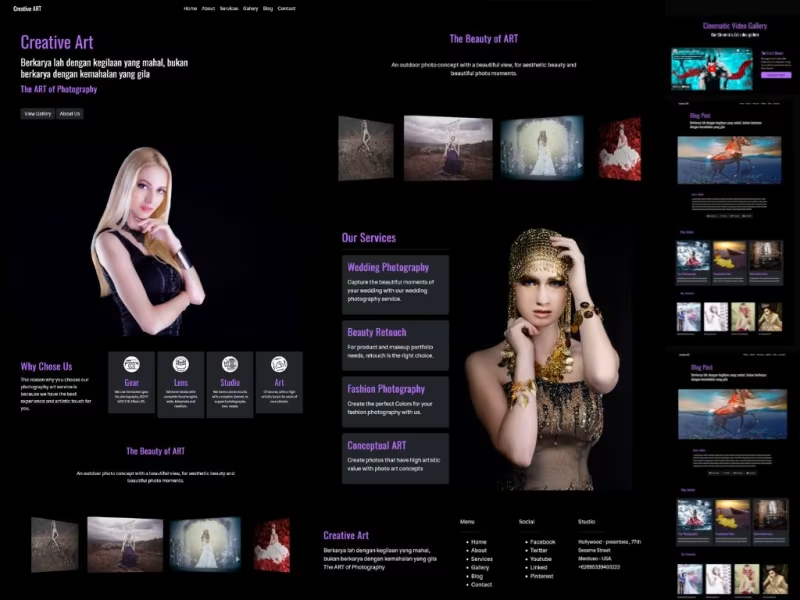
Table Of Content
- Blacks Astro JS Photography ART Themes
- Astro themeshttps://astro.build project installation
- Local Installation
- Work with this astro blacks
- Configuration and update home page
- Update About Page
- Update Article Blog Page
- Update Contact Page
- Update Gallery Index
- Update Image Gallery
- Update Video Gallery
- Update Services Page
- Update Promotion WIdget / Content
- Cloud Installation
Blacks - Astro Multipurpose Template - Portfolio, Gallery, Blog, Landing
Blacks Astro JS Photography ART Themes
When it comes to creating a multipurpose project, leveraging the power of Astro.js can truly elevate your site’s performance and SEO. Imagine a framework that allows you to build fast, optimized websites with minimal effort. Astro.js is designed for speed, enabling you to deliver content quickly by rendering only what’s necessary. This means your users get a seamless experience, and search engines can easily crawl your site, boosting your rankings.
https://www.youtube.com/watch?v=YwnAax4okAg
Incorporating art themes into your project not only enhances visual appeal but also engages your audience on a deeper level. By using components and layouts that reflect artistic styles, you can create a unique brand identity. Plus, with Astro's support for various front-end frameworks, you can mix and match to find the perfect aesthetic for your project.
Don’t forget about the importance of accessibility and responsive design. Astro.js makes it easy to ensure that your site looks great on any device, which is crucial for keeping users engaged. By focusing on these elements, you’re not just building a website; you’re crafting an experience that resonates with visitors and keeps them coming back.
---------------------------
Astro themes project installation
How to install astro js themes
Local Installation
- For first you need to install node js , you can download node here
- Download source code project and extract on your project folder.
- Access your project folder with terminal , for example your project folder is locate on desktop so you can run this command
cd C:\Users\pcname\desktop\project- change pcname with your pc name and change project with your project name. - After that you can run installation command
npm install - Now you can run your project on your local devices , with run this command
npm run dev - Visit
localhost:4321
---------------------------
Work with this astro blacks
Now you need to update and config your website,for first you need to access on src/data open config.json and home.json files and change with your needed.
You can change title, description ,and others for your website.
---------------------------
Configuration and update home page
access on src/data and open config.json files and change with your needed.
You can change title, description ,and others for your website.
fontformatter
{
    "url": "insert your website url domain here",
    "title": "insert title in here",
    "description": "Your website description",
    "favicon": "url image for your favicon",
    "image": "url image for image banner",
    "navbar": "Navbar title in here",
    "nav_list": [
      {
        "nav": "Home",
        "link": "/"
      },
// if you want add new nav menu you can simple, just copy and paste code like this..
      {
        "nav": "This is nav name",
        "link": "url for your nav menu in here"
      },
// implementation navigation area
    "nav_list": [
      {
        "nav": "Home",
        "link": "/"
      },
      {
        "nav": "This is nav name",
        "link": "url for your nav menu in here"
      }
    ],
// social media area
    "social": [
      {
        "title": "Facebook",
        "link": "https://www.fiverr.com/creativitas/"
      },
      {
        "title": "This is your social media name",
        "link": "social media url in here..."
      },
      {
        "title": "Instagram",
        "link": "https://www.fiverr.com/creativitas/create-your-custom-website-and-app"
      }
    ],
// your contact area
    "contact":
      {
        "address": "insert your address in here",
        "city": "insert city here..",
        "country": "Insert country in here...",
        "phone": "insert your phone number here..",
        "email": "insert you email here...."
      }
}
After you have setup your config files, you can save it , for update your website.
Next you can move to src/data/home.json the concept is same like config.json just change and update with your needed, this home.json for update your homepage area.
---------------------------
Update About Page
Acces on src/pages/about/index.md
about for change your about page article, you can open index.md files and change with your needed.
Fontformatter :
---
layout: ../../design/about.astro # default template
title: your title in here
description: Input description in here
image: insert url image here
intro: your intro in here
---
Write article with markdown lang in here...
Update and change with you needed, then save it.
---------------------------
Update Article Blog Page
Access on src/pages/blog
blog this area for write blog post artilce, note: don't delete or change [..pages].astro file you can create new article by create new .md files and name it with your article for example hello-wolrd.md , then you can insert this fontformatter.
---
layout: ../../design/blog/blogpost.astro # this is default themes
title: "write your title in here"
description: "insert description here"
image: insert your image url
pubDate: insert date example 2023-12-04
tags: ["insert tag here", "tag1", "tag2"]
categories: 'insert categories in here'
---
Write your content with markdown lang here...
after you have update, save it.
For simple step, you can copy and paste from example.md files, then update / edit with you needed.
---------------------------
Update Contact Page
Access on src/pages/contact/index.md
contact this area for update your contact artilce page
Fontformatter
---
layout: ../../design/contact.astro # default themes
title: title for contact page here...
description: Your description in here
image: insert url image here..
---
write your contact content here...
after you have update, save it.
---------------------------
Update Gallery Index
Access on src/pages/gallery/index.md
gallery this area for update your gallery index page
Fontformatter
---
layout: ../../design/gallery/start.astro # default themes
title: Title for your gallery page here...
description: INsert description gallery page here...
image: Insert url for image cover here...
image_icon: insert url for image gallery here...
image_text: Insert text info for your image gallery here..
video_icon: insert your video gallery icon here...
video_text: insert your text info for video gallery here...
---
after you have update, save it.
Next you can create image or video gallery content.
---------------------------
Update Image Gallery
Access on src/pages/gallery/image
gallery/image this area for update your gallery image page
Note: don't delete [...page].astro files.
Fontformatter
---
layout: ../../../design/gallery/imagepost.astro # default themes
title: Insert title in here..
description: Description in here..
image: insert url image here...
pubDate: insert publish date here.. # example : 2023-12-05
tags: ["insert tag here,," , "tag1" , "tag2"]
categories: 'insert categories here..'
---
Write content in here...
after you have update, save it.
For simple and fast step, you can copy and paste from example .md files then edit with your needed.
---------------------------
Update Video Gallery
Access on src/pages/gallery/video
gallery/video this area for update your gallery video page
Note: don't delete [...page].astro files.
Fontformatter
---
layout: ../../../design/gallery/videopost.astro # default themes
title: Insert title in here..
description: Description in here..
image: insert url image here...
video: Copy the back of the video URL from YouTube , example B6RpLTSCz5o - or you can check on example md files
pubDate: insert publish date here.. # example : 2023-12-05
tags: ["insert tag here,," , "tag1" , "tag2"]
categories: 'insert categories here..'
---
Write content in here...
after you have update, save it.
For simple and fast step, you can copy and paste from example .md files then edit with your needed.
---------------------------
Update Services Page
Access on src/pages/services
services this area for update your services artilce page
Note: don't delete [...page].astro files.
Fontformatter
---
layout: ../../design/services/servicespost.astro # default themes
title: insert title in here...
pubDate: insert publish date here.. # example : 2023-12-05
intro: insert intro your services here....
description: insert description here...
image: inser url image here...
tags: ["insert tag here," , "tag1" , "tag2"]
---
write content in here....
after you have update, save it.
For simple and fast step, you can copy and paste from example .md files then edit with your needed.
---------------------------
Update Promotion WIdget / Content
Acces on src/pages/content
content for displaying promotion services or blog on your post article .
Note: you need to create four promotion widget
Fontformatter :
---
layout: ../../design/servicespost.astro # default
title: insert title in here...
link: link for widget promotion...
description: insert description here...
image: insert url image here...
pubDate: 2023-11-28
---
Update and change with you needed, then save it.
---------------------------
Cloud Installation
Before push your project, you need to add your domain.
For first you can open astro.config.mjs
and change site url with your domain name , example
export default defineConfig({
  site: 'yourdomain.com',
  integrations: [preact()]
});
change yourdomain.com with your domain name.
- After you have finish your project, now you can make your site live. so you need push your project in to git.
- Register and create an account on github / gitlab
- After you have create github account
- Create new repo and name it with your project
- Next open your project folder with terminal, and copy paste from github command from your repo - for push your project in to your github repo.
- Now you need to register or create an account on modern static hosts such as vercel, netlify, cloudflare and others . Register with your git account.
- Next you can create new project or page - then select or integration with your github repo project.
- Click deploy - and select astro as framework
- Finish !! your website is live !!
If you want , you can use our services for work with headless cms and setup your website project,until your website is live !!
Need Help ?? Contact Us
---------------------------
Premium Astro Template - Develope by https://www.hockeycomputindo.com/en/jamstack/
URL: https://www.hockeycomputindo.com/themes/astro/blacks-complete-astro-themes/
Embed — Cloudinary
Blacks - Astro Multipurpose Template - Portfolio, Gallery, Blog, Landing
https://www.hockeycomputindo.com/themes/astro/blacks-complete-astro-themes/
DOWNLOAD →Own 100%
Blacks - Astro Multipurpose Template - Portfolio, Gallery, Blog, LandingAstro multipurpose dark template with portfolio, image gallery, video gallery, blog, landing, SEO auto. Modern, fast, responsive, own 100% source, one-time.
DOWNLOAD →DEMO →Features
astro-preact
multipurpose-dark-theme
portfolio-gallery-video
blog-categories-tags
pagination-article-page
contact-form
seo-auto-picture-transition
own-100-source
← Docus - Astro Starlight Docs Template - Documentation, Blog, LandingFinance App - Astro Startup Template - SaaS, Finance, App Landing →
Need Custom?
Hire via Fiverr Escrow
72+ verified reviews, escrow protected.
ORDER CUSTOM →Selected Premium Themes
A focused collection, not a marketplace.


Custom Web Architecture
Escrow Protected
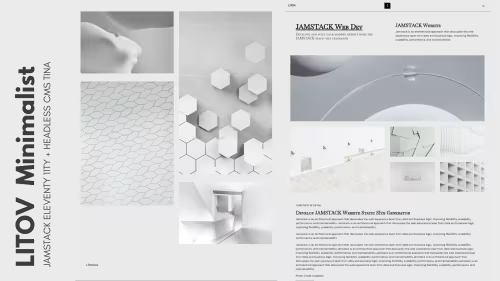
Headless Commerce, Booking OS, SSG & Vision AI - Custom built for your business - Commerce, Booking, SSG, AI - Built to own, not rented.
Own 100% .NET Engine - 12ms Build No Lock
Slow builds & rented platform? DAX .NET 8 static builder - 12ms compile, zero bloat, single binary, immutable infra you control forever. Own source, not subscription.
Order Now -> 02 — AI AutomationForensic Self-Hosted AI - Vision Finance & Autoblog
Stop giving data to cloud. SAEDI Vision runs on your infra - forensic audit trail, vision intelligence, finance automation, 100% auditable. Own pipeline & data.
Order Now -> 03 — Static Site GeneratorPython-First SSG - No Ruby Node Headache
Sick of gem & npm conflicts? Pycora is Python-native - own your pipeline, no dependency hell, no Jekyll, no Astro, just clean Python build.
Order Now ->