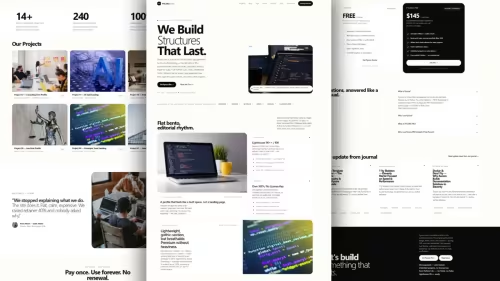
Velat — Premium Next.js 16 Theme for AI Startups | $49 Deep Dive: Pros, Cons and Best Use
Buy the Velat Next.js 16 theme for AI startups and SaaS products. 28 pre-rendered pages, TypeScript, Tailwind CSS, Markdown, dark mode, SEO-ready. $49 one-time, unlimited client projects.
nextjs16 • react • tailwindcss • typescript • jamstack • saasthemes • aistartup • landingpage •

Table Of Content
- Introduction
- What is Velat — Premium Next.js 16 Theme for AI Startups | $49?
- Key Features
- Next.js 16, App Router, and Turbopack Build System
- 28 Pre-Rendered Pages for Complete Application Footprint
- Full TypeScript Source Code and Strongly Typed Components
- Tailwind CSS Styling and Responsive Utility Classes
- Built-in Dark Mode and Color Mode Toggling
- Markdown Integration for Documentation and Blog Ecosystems
- Conversion-Focused Component Sections
- Performance and SEO
- Pricing
- Who Is This For?
- AI Startup Founders Shipping MVPs
- Full-Stack Developers and Freelancers
- Digital Agencies Building Client Portals
- Technical Writers and Product Managers
- Who Should Skip This?
- Non-Technical Users Needing No-Code Drag-and-Drop Builders
- Projects Requiring Out-of-the-Box Backend and Database Infrastructure
- Developers Committed to Legacy Next.js Pages Router
- Comparison Matrix
- Technical Implementation and Setup Guide
- Step 1: Directory Extraction and Dependency Installation
- Step 2: Running the Local Development Server
- Step 3: Configuring Site Metadata and Routing
- Step 4: Adding Markdown Content
- Introduction
- Verdict
- See It Live
- Related Themes
Introduction
Building a modern Web application for an artificial intelligence product or software-as-a-service platform involves far more than configuring an algorithm or setting up API endpoints. Founders, engineers, and digital product agencies frequently face a persistent operational hurdle: the time required to build a polished, responsive, and search-engine-optimized marketing site from scratch. Creating accessible landing pages, layout structures, content routes, and documentation hubs manually can consume weeks of engineering resources that would otherwise be directed toward core model architecture and product development.
The rapid cadence of modern software development demands solutions that eliminate unnecessary front-end setup while maintaining code quality and extensibility. Modern digital products require high-performing UI layouts, mobile-responsive styling, dark mode support, and structured content directories for technical documentation and company announcements. Without an organized front-end template, engineering teams often end up stitching together disparate UI libraries, which leads to bloated bundles, inconsistent design language, and fragmented styling systems.
This long-form technical review examines how Velat — Premium Next.js 16 Theme for AI Startups | $49 resolves these structural inefficiencies. By offering a comprehensive Jamstack boilerplate equipped with modern web tooling, static page pre-rendering, and structured Markdown support, this premium template aims to bridge the gap between back-end technical innovation and front-end presentation.
What is Velat — Premium Next.js 16 Theme for AI Startups | $49?
Velat is a commercial, production-ready website theme designed specifically for artificial intelligence startups, SaaS providers, and tech founders who require an organized, scalable web architecture. Built upon Next.js 16 and rendered using Turbopack, Velat leverages the full capabilities of React, TypeScript, and Tailwind CSS. It is packaged with 28 pre-rendered pages and structured components tailored for software products, including dedicated sections for product overviews, interactive feature breakdowns, documentation hubs, company blogs, team member pages, and contact portals.
The underlying philosophy of Velat centers on structural utility and developer convenience. Rather than offering purely decorative graphical elements, the theme focuses on high-converting presentation layouts and clear code organization. It includes static site generation (SSG) capabilities through the Next.js App Router, allowing websites built on top of it to serve statically optimized HTML pages directly to users and search engines without introducing unnecessary dynamic processing overhead.
Developers working with Velat receive complete TypeScript source code, giving them direct access to component props, layout structures, and utility functions. The template includes built-in dark mode capabilities, native Markdown content parsing for engineering docs and articles, and search-engine-optimized meta structure out of the box. Designed for deployment on modern cloud platforms such as Vercel, Velat connects cleanly into standard CI/CD deployment pipelines, enabling developers to build, preview, and host production-ready sites with minimal configuration.
For $49 as a single, one-time payment, the template provides an commercial license permitting usage across an unlimited number of personal or commercial client projects. This structure makes Velat a flexible starting point for indie developers launching individual software tools, as well as digital development agencies delivering custom marketing portals for enterprise clients.
Key Features
Next.js 16, App Router, and Turbopack Build System
Velat utilizes Next.js 16 as its base engine, exploiting modern routing paradigms brought by the App Router. The layout architecture takes advantage of server-side component rendering and static file generation to deliver rapid page load speeds. By incorporating Turbopack as the default development bundler, local code compilation, server start times, and hot-module replacement (HMR) perform efficiently. This framework foundation guarantees that modern rendering patterns are enforced throughout the application tree. Developers can easily manage root layouts, nested routes, metadata configurations, and global page wrappers without writing custom routing layers.
28 Pre-Rendered Pages for Complete Application Footprint
A key structural highlight of Velat is its collection of 28 pre-rendered pages. Rather than providing only a basic single-page landing layout, the template provides a complete multi-page architecture designed to support dynamic growth. Included in the package are dedicated layouts for high-level landing pages, detailed product feature showcases, comprehensive software documentation hubs, company background pages, multi-author blog indexes, detail view templates, and structured contact forms. This broad page set ensures that teams can build complete marketing ecosystems, documentation platforms, and product information hubs directly out of a single codebase.
Full TypeScript Source Code and Strongly Typed Components
To maintain high code standards and reduce runtime errors, Velat is written entirely in TypeScript. All components, utility functions, layout parameters, and content structures are defined with explicit type definitions. This approach allows developers using modern IDEs like VS Code to benefit from real-time autocomplete, inline type checking, and quick prop discovery during site customization. By leveraging strong typing across the entire component library, engineers can modify theme layouts, integrate custom API payloads, and build secondary sub-components without breaking existing layout logic or passing invalid parameters down component trees.
Tailwind CSS Styling and Responsive Utility Classes
Styling across the entire Velat application structure is powered by Tailwind CSS. The template avoids custom, hardcoded CSS blocks in favor of utility-first classes, promoting consistent margins, padding, typography scales, flexbox grid arrangements, and color systems across every single viewport width. The design framework features full media-query responsiveness, ensuring that complex page sections—such as multi-column pricing grids, feature comparative tables, and interactive navigation headers—reorganize cleanly across mobile, tablet, desktop, and ultra-wide displays. Modifying global themes, primary brand palettes, or border radius rules requires altering central Tailwind configuration files.
Built-in Dark Mode and Color Mode Toggling
Modern tech applications and AI platform interfaces expect dark mode presentation out of the box. Velat includes integrated dark mode support configured using class-based theme toggles and system preference detection. The visual design across all 28 pages uses defined color tokens that adapt when switching between light and dark visual themes. High-contrast typography, carefully balanced background surfaces, subtle drop shadows, and visual focal elements are maintained across both rendering modes, eliminating visual glitches or unreadable text blocks when visitors toggle color schemes.
Markdown Integration for Documentation and Blog Ecosystems
Content delivery for engineering documentation, knowledge bases, and company updates is handled via Markdown integration. Instead of forcing teams to configure a separate, external headless Content Management System (CMS) or write hardcoded HTML for long-form articles, Velat reads structured Markdown files directly from local repository directories. The theme parses frontmatter metadata—such as publish dates, authors, tags, and page summaries—and transforms raw Markdown syntax into structured, styled HTML output complete with typography styling, code blocks, bulleted lists, and blockquotes.
Conversion-Focused Component Sections
The theme features custom UI sections optimized specifically for user engagement and lead conversion. It contains pre-styled testimonial layouts, founder highlight boxes, pricing plan cards with billing frequency toggles, interactive FAQ accordions, feature comparison charts, CTA banner strips, and visual social proof arrays displaying client badges. These sections allow marketing teams and technical founders to lay out product value propositions clearly, present software features logically, and encourage trial sign-ups without needing to design or code specialized marketing widgets from scratch.
Performance and SEO
Website speed and structural search engine optimization directly impact user retention and organic search rankings. Velat addresses performance considerations at the core architectural level through Static Site Generation (SSG). During build time, Next.js compiles the template's 28 pre-rendered pages into pure static HTML, CSS, and minimal JavaScript assets. When a user requests a page, the edge network delivers pre-built static files instantly, reducing time-to-first-byte (TTFB) and avoiding dynamic server rendering overhead for static pages.
From an SEO perspective, Velat comes ready with structured metadata integration built upon the Next.js Metadata API. Each page layout contains optimized metadata slots for document titles, canonical URLs, description strings, Open Graph (OG) social sharing cards, and Twitter summary markup. Because content parsing relies on static pre-rendering, search engine crawlers can index complete page content, header tags, image attributes, and internal page links without executing client-side JavaScript runtime scripts.
+-------------------------------------------------------------------+
|                     Velat Build Architecture                      |
+-------------------------------------------------------------------+
|  Content Layer      |  Markdown Files (.md) + Frontmatter         |
|  Styling Layer      |  Tailwind CSS Engine + Dark/Light Tokens   |
|  Type Engine        |  TypeScript Type System & Interfaces        |
|  Framework          |  Next.js 16 App Router + Turbopack          |
+-------------------------------------------------------------------+
                                  |
                                  v
+-------------------------------------------------------------------+
|                     Static Site Generation (SSG)                  |
+-------------------------------------------------------------------+
                                  |
                                  v
+-------------------------------------------------------------------+
|  Edge CDN Deployment (Vercel, Netlify, Cloudflare Pages, GitHub)  |
+-------------------------------------------------------------------+
Furthermore, by combining Turbopack compilation with lightweight Tailwind utility bundles, Velat limits page asset payload sizes. Clean HTML output paired with semantic heading structures (?h1?, ?h2?, ?article?, ?section?) supports accessibility standards and conforms to modern search engine ranking criteria.
Pricing
Velat is distributed under a straightforward commercial pricing model designed to provide high long-term value to independent developers, startup teams, and agency studios:
- Price: $49 one-time payment.
- Usage License: Unlimited client and commercial projects.
- Recurring Costs: None. No monthly user fees or tier-based subscriptions.
- Source Code Access: Full access to all TypeScript source code, Tailwind configuration, page layouts, components, and Markdown templates upon purchase.
+--------------------------------------------------------------------+
|                         PRICING STRUCTURE                          |
+--------------------------------------------------------------------+
|  Cost             |  $49 (One-time payment)                        |
|  Project Cap      |  Unlimited personal and client projects        |
|  Source Access    |  Full TypeScript source code included          |
|  Included Pages   |  28 pre-rendered layout templates             |
|  Submissions      |  No ongoing platform seat fees                 |
+--------------------------------------------------------------------+
This pricing model allows agencies to deploy the theme across multiple commercial client accounts without incurring additional per-domain licensing charges or monthly usage overhead.
Who Is This For?
AI Startup Founders Shipping MVPs
Founders who are focused on training machine learning models, deploying LLM pipelines, or building AI services need a functional, professional marketing platform that can be published quickly. Velat provides a ready-made structure to detail product features, communicate API capabilities, present transparent pricing models, and convert visitors into early-access beta users without requiring dedicated design teams.
Full-Stack Developers and Freelancers
Developers who want a clean React codebase built on top of modern technology standards will appreciate Velat's technical foundation. Equipped with Next.js 16, TypeScript, and Tailwind CSS, full-stack engineers can easily extend the template, plug in back-end logic, create custom API handlers, or integrate front-end dynamic features while maintaining consistent styling and high code quality.
Digital Agencies Building Client Portals
Agencies that regularly develop marketing portals, SaaS landing pages, and documentation hubs for client projects can utilize Velat as an internal production starter kit. The $49 unlimited commercial use license allows agency teams to rapidly deploy customized websites for multiple clients, reducing project timelines and lowering development costs.
Technical Writers and Product Managers
Teams that need to launch technical documentation portals alongside company blogs will benefit from Velat's local Markdown content workflow. Product managers and technical writers can write documentation and publish blog posts using standard Markdown notation without interacting with complex CMS platforms or editing core layout components directly.
Who Should Skip This?
Non-Technical Users Needing No-Code Drag-and-Drop Builders
Velat is a developer template that requires familiarity with web development tools, including Node.js, terminal commands, Git, and code editors. Non-technical users looking for visual drag-and-drop page builders (such as WordPress plugins, Wix, or Squarespace visual editors) should look for alternative no-code platforms, as customizing Velat requires editing React components and configuration files directly.
Projects Requiring Out-of-the-Box Backend and Database Infrastructure
Velat focuses primarily on front-end UI layouts, static page generation, and client-side content structure. It does not include pre-configured backend databases, database schemas, ORM integrations, user authentication workflows, or payment gateways out of the box. Organizations expecting a full-stack web application starter kit with built-in database ORMs and user session engines will need to integrate those backend services manually.
Developers Committed to Legacy Next.js Pages Router
Teams maintaining existing codebases built specifically around the legacy Next.js Pages Router structure may experience integration friction. Velat is designed around the Next.js 16 App Router model. Developers who are not prepared to adapt to App Router patterns, layout files, and server component abstractions should consider legacy-compatible alternatives.
Comparison Matrix
| Technical Feature | Velat Next.js 16 Theme | Basic Free Starter Templates | Custom Tailored Development |
|---|---|---|---|
| Price / License | $49 (One-time, unlimited projects) | Free / Open Source | $5,000 - $15,000+ custom build |
| Framework Engine | Next.js 16 + Turbopack | Varies (often older Next.js/React) | Any custom engine |
| Pre-rendered Pages | 28 Complete Page Templates | 1 to 3 basic pages | Built from zero |
| Type Safety | Full TypeScript Integration | Basic JS or limited TS | Configured manually |
| Styling Framework | Tailwind CSS + Dark Mode | Unstructured CSS / Styled Components | Configured manually |
| Content Pipeline | Native Local Markdown Parsing | Manual hardcoded HTML | Custom CMS integration required |
| Development Time | Hours to launch | Days of setup and styling | Weeks to months of development |
Technical Implementation and Setup Guide
Deploying a website with Velat follows standard JavaScript ecosystem practices. Because the template uses modern dependency structures, developers can launch a development environment quickly using standard package managers such as npm, pnpm, or yarn.
Step 1: Directory Extraction and Dependency Installation
After purchasing and downloading the theme archive, unpack the source files into your local project workspace. Open your preferred terminal interface, navigate to the extracted directory, and run the dependency installation command:
# Navigate to project directory
cd velat-nextjs-theme
# Install project dependencies using npm or pnpm
npm install
Step 2: Running the Local Development Server
To launch the local development environment driven by Next.js 16 and Turbopack, run the standard development script:
# Start the local development server with Turbopack
npm run dev
The terminal will initiate the build process and serve the application locally at http://localhost:3000. Turbopack tracks code edits across components, styles, and Markdown files, reflecting updates in the browser in real time.
Step 3: Configuring Site Metadata and Routing
Customizing brand settings, meta tags, titles, and structural links involves updating the root layout files located within the App Router directory structure:
// app/layout.tsx
import type { Metadata } from 'next';
import '../styles/globals.css';
export const metadata: Metadata = {
  title: 'Your AI Startup Name — Next-Gen AI Solutions',
  description: 'Deploy advanced artificial intelligence tools using our software platform.',
  openGraph: {
    title: 'Your AI Startup Name',
    description: 'Deploy advanced artificial intelligence tools using our software platform.',
    url: 'https://your-domain.com',
    siteName: 'Your AI Platform',
    locale: 'en_US',
    type: 'website',
  },
};
export default function RootLayout({
  children,
}: {
  children: React.ReactNode;
}) {
  return (
    ?html lang="en" class="dark"?
      ?body class="bg-slate-900 text-slate-100 antialiased"?
        {children}
      ?/body?
    ?/html?
  );
}
Step 4: Adding Markdown Content
Writing new documentation entries or blog articles requires adding .md files to the designated local content folder. The theme automatically reads the header frontmatter to render index grids and detailed article views:
---
title: "Understanding Transformer Networks in Modern AI"
date: "2026-10-31"
author: "Engineering Team"
summary: "An in-depth explanation of how attention mechanisms drive modern language models."
tags: ["AI", "Machine Learning", "Engineering"]
---
## Introduction
Transformer networks form the foundation of modern natural language processing...
Step 5: Production Build and Static Export
To prepare the application for production deployment, run the static build command. Next.js static site generation pre-builds all 28 static pages into optimized HTML and CSS bundles in the .next or out output directory:
# Build production bundle
npm run build
Once built, the project directory can be committed to a Git repository and connected directly to hosting providers such as Vercel, Netlify, or Cloudflare Pages for instant global deployment over an edge CDN network.
Verdict
Velat offers a practical, highly functional front-end solution for founders, full-stack engineers, and digital agencies building websites for AI startups and modern software platforms. By pairing Next.js 16 and Turbopack with TypeScript, Tailwind CSS, dark mode support, and local Markdown parsing, the theme provides a production-ready codebase that eliminates front-end setup overhead.
Its collection of 28 pre-rendered pages covers a wide array of application needs—ranging from high-converting landing layouts and interactive feature showcases to documentation hubs and blog indexes. While non-technical users and teams seeking an all-in-one backend solution will need to add custom integrations, developers seeking a high-quality static starter kit will find Velat to be an efficient, cost-effective tool. At a one-time price of $49 for unlimited client projects, Velat delivers solid commercial value and speeds up product launch timelines.
See It Live
Read the full theme details at Velat — Premium Next.js 16 Theme for AI Startups | $49.
Try the demo: Demo
Related Themes
Explore more at All Themes and Premium Themes.
← Review Blacks Complete Astro ThemesChoosing Between PaperHouse - Astro Bento Portfolio Template - Works, Blog, Docs, Order and Docus - Astro Starlight Docs Template - Documentation, Blog, Landing? Read This First →
Need Custom?
Hire via Fiverr Escrow
72+ verified reviews, escrow protected.
ORDER CUSTOM →